

Not every Space has entities. Whether a Space anchors on a contact — and what it calls one — is set
under Edit Space → Records → Base record. See Configuring a Space.
Contacts and organisations
A Space can declare up to two anchors:
Each anchor points at one of the Space’s attached record configs, so the fields you fill in when
creating one — and the schema they’re validated against — come from that config, not from a fixed
form. Each also carries its own icon, shown wherever that kind of entity is listed: on its avatar,
in the entity list, and above its folder.
Where entities show up
The Contacts panel
A Space with a contact anchor shows a panel in its panel row named after that record — Contacts by default, or whatever the Space calls one instead (for example, Clients) — see Spaces Overview. What it looks like depends on whether the Space also declares an organisation:- Contact only
- Contact + organisation
One flat list of every contact in the Space. There is no organisation grouping.
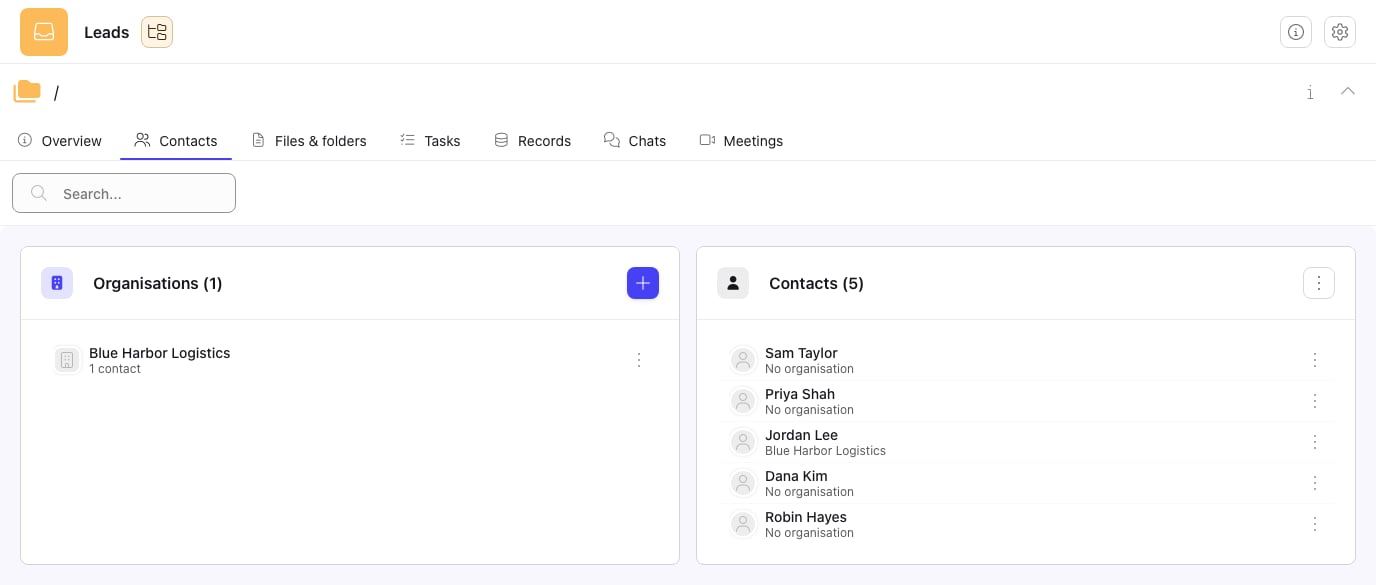
The Contacts panel at a Space root: every organisation and contact filed there.
Contacts and organisations created before folder scoping existed still show up: they’re classified
by the record config their folder marker points at, falling back to the old literal label it was
created with. Nothing is lost by the switch to the newer panel.
The Folder field on a task
A task’s Folder field is a picker of the Space’s contacts — not a filing tree. Assigning a task to a contact’s identity (an email address, for example) files it under that contact automatically. See Folders and contacts for the full behaviour, including what happens when the link can’t be made.Creating a contact
From the Contacts panel (or the client actions menu on the Files and Tasks panels), choose New <contact label>. The form is generated from the Space’s base record configuration, so the fields you see match whatever schema that config defines. Creating a contact:- Mints the contact’s own folder, keyed on its identity fields (the fields the Space uses to tell one contact from another — usually an email address).
- Does not, by itself, give the contact a sign-in to the client portal. That’s a separate, deliberate step — see Client Portal.
A contact filed under an organisation is created from inside that organisation’s folder, or by
picking the organisation on the contact’s own form — whichever the Space’s layout offers.
Searching and filtering
The folder-scoped panel has its own search box, scoped to the folder you’re in — it matches contacts and organisations filed there, not the whole Space. Clearing the search returns to the full listing for that folder.Related
Spaces Overview
Setting a Space’s base record and organisation record.
Tasks
How a task’s Folder field relates to contacts.
Client Portal
Giving a contact a sign-in, and what they see once they have one.
Records
The record sets a Space attaches, including the ones its entities are built from.