

The learning document is a reference for you and your team. It is not currently read by the assistant during conversations — rating a response does not automatically change how the assistant behaves. If you want an insight to affect the assistant, copy it into the assistant’s own instructions yourself.
Key Features at a Glance
- Rate Responses — Thumbs-up or thumbs-down individual assistant responses. This is on by default in the QuivaWorks app; if you’re using an embedded chat widget, it’s off by default and needs to be enabled for the widget.
- Rate a Conversation — A “Rate this conversation” option is also available. It keeps only one rating per user per assistant, so rating a new conversation overwrites your previous conversation rating.
- Review & Edit the Learning Document — See the consolidated document on the assistant’s Learning tab and edit it directly.
- Automatic & Manual Consolidation — Consolidation runs automatically once 10 ratings are pending for an assistant (with a short cooldown between attempts), or you can trigger it manually with the Consolidate button.
Feedback visibility is account-wide, not per-assistant. Any member of your account can view, consolidate, or overwrite the learning document for any assistant in the account — access is not restricted to people who work with that specific assistant.
Getting Started with Assistant Learning
Rate Your First Conversation
Rating conversations is the simplest way to build up feedback. You’ll see rating options right in the chat interface after each assistant response.- During or after a conversation with an assistant, look for the rating buttons below the assistant’s message
- Click the thumbs up (👍) to indicate a good response, or thumbs down (👎) for a response that could improve
- To rate the whole conversation instead, use the “Rate this conversation” option at the bottom of the chat — note this replaces any previous conversation-level rating you gave that assistant
- Select your rating — the system captures your feedback immediately
- View the results by opening the assistant’s settings and selecting the Learning tab. You can review and edit the document manually, and consolidate any pending feedback
Understanding the Learning Document
Viewing the Learning Document
Each assistant has a Learning tab where you can see the consolidated document generated from feedback, plus a count of feedback still pending consolidation.- Navigate to your assistant’s settings or details page
- Select the Learning tab
- Review the consolidated document — an AI-generated summary of themes in the feedback, and what’s working well or not
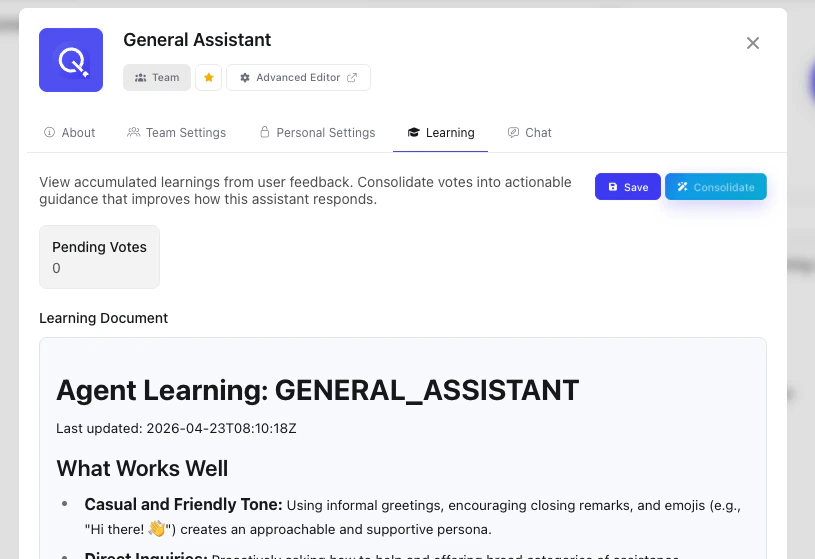
The Learning tab shows the document itself and a pending-feedback count — it does not list individual ratings, and there’s no way to view or delete a single vote. Editing the document text directly is the way to change what it contains.
How Consolidation Works
When feedback is consolidated, an AI model analyses the pending ratings and rewrites the learning document. This process:- Identifies common themes across the feedback
- Summarises what’s being rated positively or negatively
- Generates actionable observations
Using Learning Insights
The learning document is not applied automatically — nothing in QuivaWorks feeds it back into the assistant’s behaviour on its own. If you want the insights to have an effect, copy the relevant parts into the assistant’s own instructions or system prompt, the same way you’d edit any other instruction text.Common Questions About Assistant Learning
Does rating responses automatically change how the assistant behaves?
Does rating responses automatically change how the assistant behaves?
No. Ratings are consolidated into a document you can read and edit, but the assistant does not read that document during conversations. To change behaviour, copy what you want from the document into the assistant’s instructions.
Can I edit or delete learning feedback?
Can I edit or delete learning feedback?
You can edit the consolidated document directly in the Learning tab. There’s no view of individual ratings and no way to delete a specific one — editing the document text is the available control.
How do I stop consolidation for an assistant?
How do I stop consolidation for an assistant?
There’s no separate on/off switch. Consolidation only has something to work with once ratings are submitted, so simply not rating conversations for an assistant keeps its document empty.
Is my feedback private?
Is my feedback private?
Feedback is stored under your account, but visibility is account-wide rather than per-assistant: any member of your account can view, consolidate, or edit the learning document for any assistant, not only people who use that assistant.
Can multiple users rate the same conversation?
Can multiple users rate the same conversation?
Yes for individual message ratings — each person’s thumbs up/down on a response is captured independently. The “Rate this conversation” option is different: it holds one slot per user per assistant, so a user’s rating of a later conversation overwrites their rating of an earlier one.
What happens to learning feedback when I delete an assistant?
What happens to learning feedback when I delete an assistant?
Deleting an assistant does not delete its learning document or the votes behind it — that data is not removed as part of deleting the assistant.
Best Practices for Assistant Learning
Provide Consistent Feedback
Rate responses regularly so the consolidated document stays accurate and useful as a reference, and so consolidation has enough signal to identify real patterns rather than one-off comments.Be Specific About Why You’re Rating
When possible, correct the assistant directly in the chat and then rate the corrected response positively — that gives consolidation a concrete example to work from, not just a thumbs-down.Copy Insights Into Assistant Instructions
The learning document itself doesn’t change assistant behaviour. Review it periodically and copy anything useful — recurring corrections, preferences, tone notes — into the assistant’s instructions directly.Review Learning After Consolidation
Check the document after each consolidation to make sure it’s accurate. Since you can edit it directly, correct anything that doesn’t reflect what you meant before relying on it.Next Steps
Prompt Engineering
Learn how to write and update assistant instructions — the place to apply anything you copy from a learning document
Assistant Capabilities
See what else you can configure on an assistant beyond learning