

When to Deploy
You should deploy your application when:- JavaScript interactions aren’t working in preview — Buttons, forms, calculations, or other interactive features need deployment to function fully
- You need a shareable URL — You want to send the app to clients, colleagues, or customers
- You want a mobile-friendly experience — Accessed from various devices with full functionality
- You’re building customer-facing tools — Calculators, dashboards, configurators, or interactive experiences
Deployment Process
Request Deployment
Tell your assistant you’re ready to go live:“Deploy this as a live web app” “Make this interactive calculator live and shareable” “Deploy and give me a public URL for this app”The assistant handles everything else.
What Happens Behind the Scenes
- Gateway Creation — QuivaWorks creates a website gateway for your app
- File Upload — Your HTML, CSS, and JavaScript files are uploaded to secure object storage
- URL Generation — A public URL is created and provided to you
- Activation — Your app is live and accessible immediately
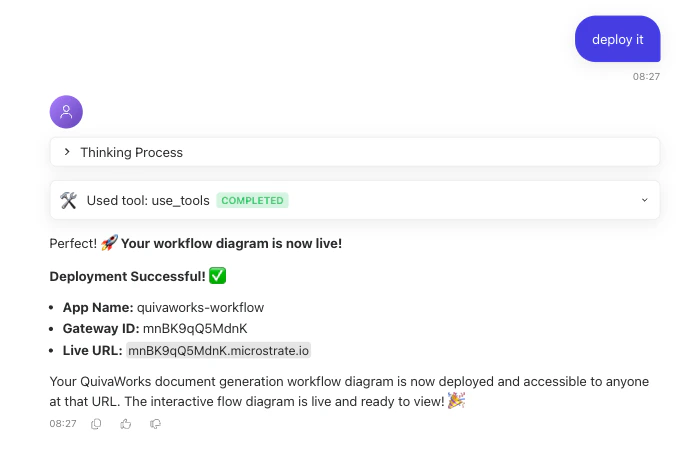
Receiving Your Public URL
After deployment, you’ll receive a public URL on a randomly generated subdomain, shown on the app card once deployment finishes. This URL:- ✅ Works on any device (desktop, tablet, mobile)
- ✅ Can be shared with anyone (no login required)
- ✅ Supports full JavaScript functionality
- ✅ Remains accessible indefinitely
- ✅ Can be embedded in emails or documents
Sharing & Using Deployed Apps
Share Your App
Once you have your public URL, you can:- Send the link directly to individuals or teams
- Post on social media or your website
- Embed in documents or presentations
- Include in email campaigns or newsletters
- Integrate with other tools that accept web links
Access Deployed Apps
Anyone with the link can open your app in a web browser. No login, no installation, no special software required.Common Deployment Use Cases
Interactive Calculators Unit converters, pricing tools, ROI estimators, and cost breakdowns. Customer Dashboards Real-time metrics displays, analytics visualizations, and data summaries. Interactive Portfolios Showcase your work with interactive projects, galleries, and case studies. Product Configurators Let customers customise products and see options dynamically update. Educational Tools Interactive tutorials, quizzes, learning games, and educational apps.Managing Deployed Apps
Updating Your Application
If you need to make changes to a deployed app:- Generate a new version — Ask the assistant to create an updated version of your application
- Update the existing app — Ask the assistant to update the app rather than deploy a new one, and it keeps the same URL
Deploying an app again always mints a new URL. To keep your existing URL, ask the assistant to update the existing app instead of deploying a new one.
Removing Access
To stop sharing a deployed app:- Stop sharing the URL — Simply don’t share it further
- Communicate updates — Notify people who have the link if it’s no longer available
- Generate a new version — Create a new app with fresh functionality
- Delete the existing app - Navigate to your apps, click “delete” for the app you want to remove, and type the app’s name to confirm
Troubleshooting Deployments
My deployed app doesn't work correctly. What should I do?
My deployed app doesn't work correctly. What should I do?
Ask your assistant to review the app and make corrections. Then request redeployment. The assistant can debug issues and ensure the updated version works perfectly before deploying.
Can I deploy the same app multiple times?
Can I deploy the same app multiple times?
Yes, you can deploy updated versions as many times as needed. If you need to create a new URL, so previous versions can remain live or be retired, just ask the assistant.
How long do deployed apps stay live?
How long do deployed apps stay live?
Deployed applications remain live indefinitely. They stay accessible as long as they’re hosted in QuivaWorks object storage on available on your QuivaWorks gateway.
Can other people edit my deployed app?
Can other people edit my deployed app?
No, deployed apps are read-only for visitors. Only you (through your assistant) can generate new versions and deploy updates. Visitors can interact with the app but cannot modify it.
What if I want a custom domain for my app?
What if I want a custom domain for my app?
Custom domains are self-service, per app: open the app card, select Manage, then go to the Domains tab to add and configure one.
Are deployed apps secure?
Are deployed apps secure?
Yes, apps are deployed through QuivaWorks infrastructure with standard web security practices. They’re accessible via public URLs but hosted securely.
Can I track who's using my deployed app?
Can I track who's using my deployed app?
Through the public URL, apps are openly accessible. For detailed analytics or usage tracking, you’d need to integrate additional tools or ask your assistant about monitoring options.
Next Steps
Generate Your Web App
Ask your assistant to create an interactive web application. Be specific about functionality, design, and purpose.
Assistant Capabilities
See the full range of what an assistant can do beyond deploying web apps.
Creating Your First Assistant
Set up an assistant that can generate and deploy apps for you.
Collaboration
Share your public URL and collaborate with colleagues on deployed apps.
Ready to Deploy? When your interactive app is ready, simply ask your assistant to deploy it. You’ll have a live, shareable web application within moments—no technical expertise required.