> ## Documentation Index
> Fetch the complete documentation index at: https://docs.quiva.ai/llms.txt
> Use this file to discover all available pages before exploring further.
# Product Updates
> Updates, improvements and bug fixes
**Release Date:** 6th May 2026
**Version:** v1.2.2
**Release Type:** Patch Release - Small Feature Updates & Bug Fixes
# Quiva v1.2.2 – Enhanced Chat & Document Processing
This patch release maintains full backward compatibility with v1.2.1. No migration steps required.
## 🎯 Key Highlights
Enhanced user mention handling and session management for smoother interactions
Refined document preview interface with improved navigation and download capabilities
Enhanced Word and PowerPoint document generation with improved formatting
Fixed document encoding issues and admin authorization problems
## ✨ What's New
### Enhanced Chat Experience
We've significantly improved the chat interface with better user mention handling and confirmation flows. The chat UI now includes improved session management, making it easier to track and organize conversations. Users will notice smoother interactions when mentioning colleagues and a more intuitive message handling experience.
* It is easier to see who sent which message
* When a response is being actively received, the UI provents you from sending another message
* Subscribes to live chats as soon as you open them
### Refined Document Preview Interface
The document viewing experience has been enhanced with an improved preview interface, updated navigation controls, and better visual organization. Users can now more easily browse and download knowledge base files with an optimized interface that provides clearer visibility and control.
### Advanced Document Generation Capabilities
Word and PowerPoint document generation has been improved with enhanced formatting controls and more robust generation capabilities. These improvements ensure documents are generated with better formatting consistency and reliability across different scenarios.
To get the most out of document generation, ensure that you explicitly state the formatting requirements or provide a template document and give specific instructions to use the document as the template.
## 🛠️ Bug Fixes & Improvements
Resolved a critical issue where Word documents containing special character encodings (specifically byte order marks) were incorrectly marked as unreadable by the assistant. This fix ensures that documents with various encoding types are properly processed and readable.
Fixed an authorization error that prevented administrators from successfully deleting user accounts. The system now properly handles admin permissions when removing users from the platform.
Enhanced the email trigger system to more accurately identify and route messages to the correct forwarding email addresses, improving reliability of email-based automations.
Removed unnecessary file generation dependencies to improve system efficiency and reduce maintenance overhead.
Updated help documentation references across the application to ensure users always have access to the most current guidance.
## 📞 Support & Feedback
Explore comprehensive guides and API documentation
Join our community Slack workspace for discussions
Reach out to our support team for assistance
Share your ideas and feature requests with our team
***
**Release Date:** April 24, 2026
**Version:** v1.2.1
**Release Type:** Patch Release
# Quiva v1.2.1 – Enhanced Learning & Customization
This release includes significant improvements to the Agent Learning System, expanded file generation capabilities, and new simplified deployment options. All changes are backward compatible with existing installations.
## Overview
Mintlify v1.2.1 brings powerful enhancements to agent intelligence, content generation, and deployment capabilities. This release focuses on making intelligent agents more adaptive, simplifying multi-format file creation, enabling one-click app deployment, and enhancing brand customization across the platform.
## 🎯 Key Highlights
Assistants now learn from user feedback with upvote/downvote mechanisms on conversations and messages, improving response quality over time.
Customize your entire platform with custom colors, app naming, and branding configurations from the global admin section.
Deploy static web applications and landing pages with zero infrastructure complexity.
Generate documents in PDF and Word formats directly from your workflows and conversations.
## ✨ What's New
### Intelligent Assistant Learning
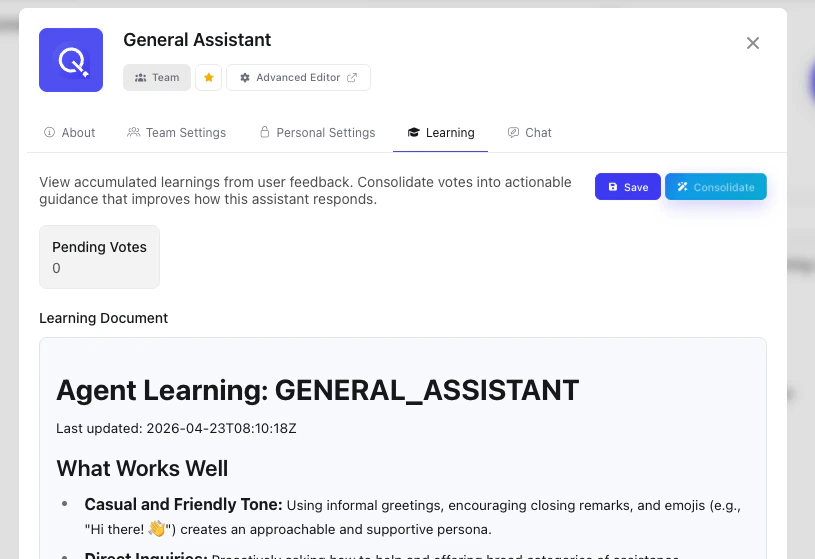
Assistants can now learn and improve from user interactions. When users upvote or downvote assistant responses, this feedback is captured and used to refine future responses. The learning system tracks both individual message feedback and broader conversation-level evaluations, enabling your assistants to continuously improve accuracy and user satisfaction.
Understand how to improve your Assistants through feedback
 ### Comprehensive Platform Customization
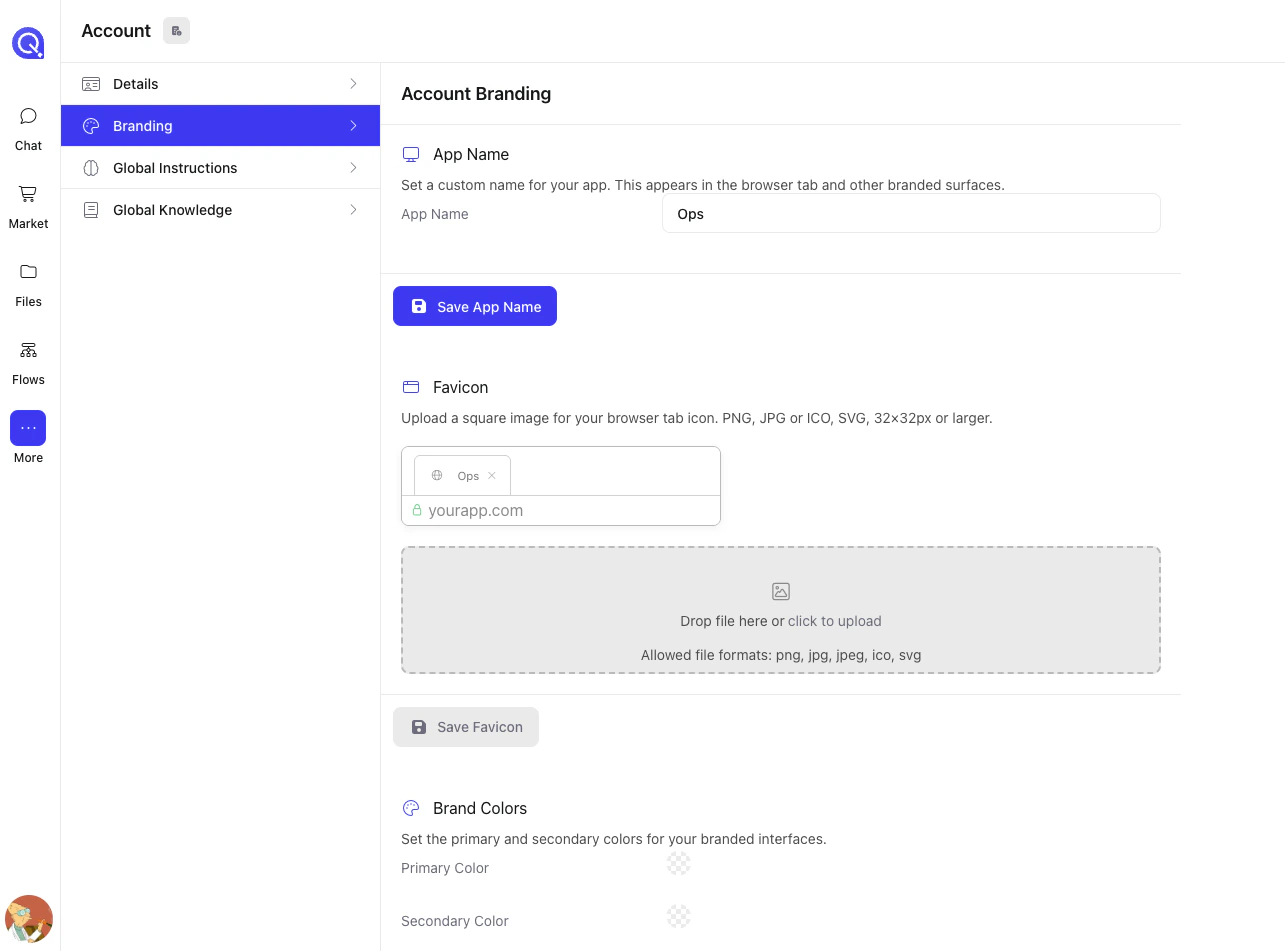
The new Global Admin Branding section allows you to control every visual aspect of your platform. Set custom primary and secondary colors, define your own application name, configure global knowledge bases, and even set custom favicons. This gives your organization complete white-label capability without requiring code changes.
Customise the branding of your interface and add global instructions and knowledge
### Comprehensive Platform Customization
The new Global Admin Branding section allows you to control every visual aspect of your platform. Set custom primary and secondary colors, define your own application name, configure global knowledge bases, and even set custom favicons. This gives your organization complete white-label capability without requiring code changes.
Customise the branding of your interface and add global instructions and knowledge
 ### File Generation
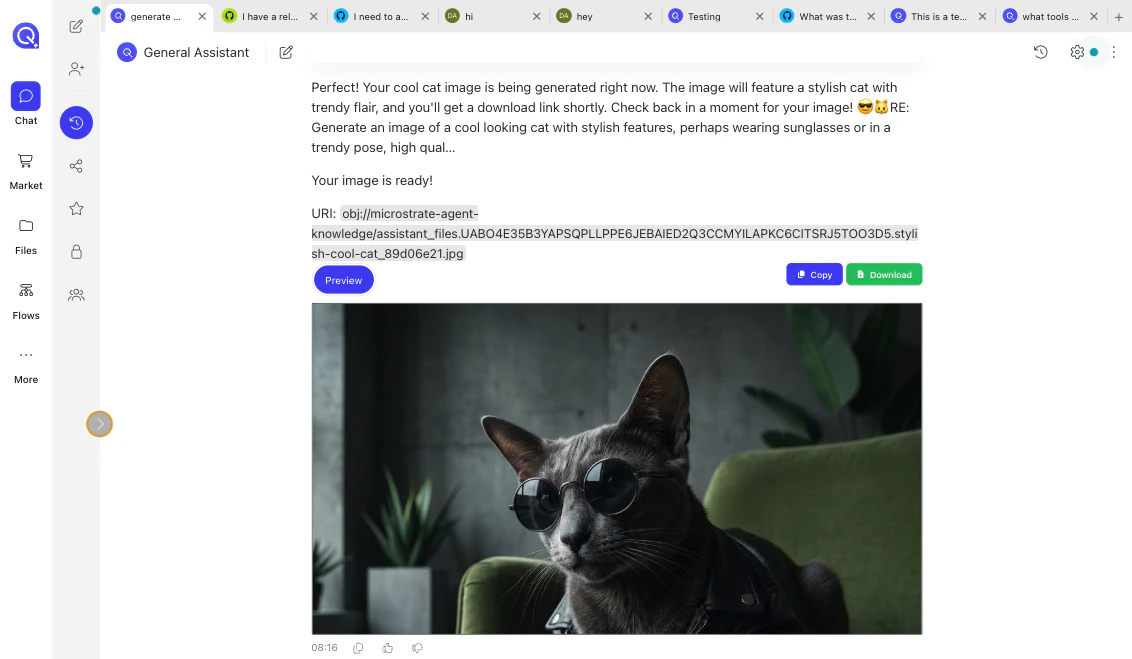
Generate professional documents directly from your assistant workflows. Convert conversations and data to PDF or Word documents with full formatting support. Perfect for creating reports, documentation, and shareable outputs from your Quiva interactions.
Learn more about what what files can be generated and how it works
### File Generation
Generate professional documents directly from your assistant workflows. Convert conversations and data to PDF or Word documents with full formatting support. Perfect for creating reports, documentation, and shareable outputs from your Quiva interactions.
Learn more about what what files can be generated and how it works
 ### Simple App Deployment
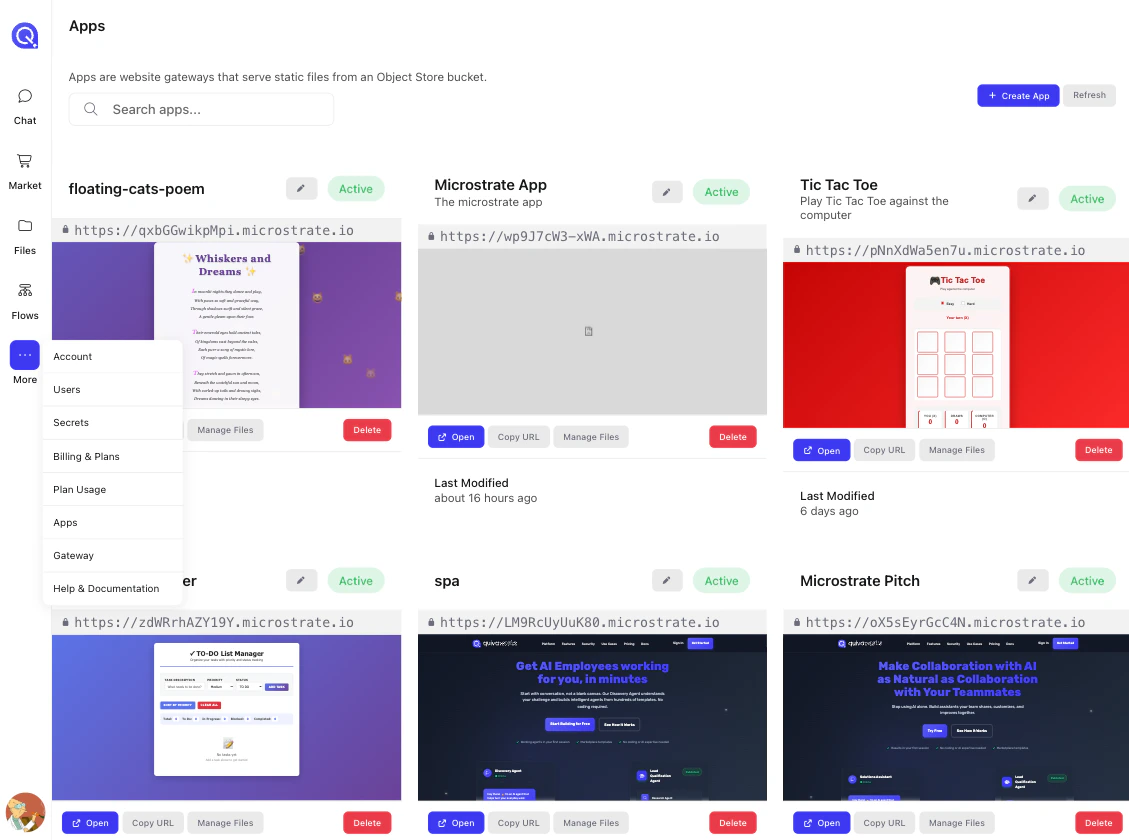
Assistants can now deploy static web applications, landing pages, and interactive dashboards:
* **Zero Configuration**: No Docker, Kubernetes, or infrastructure setup required
* **Just Ask Deployment**: As for deployment and your HTML, CSS, and JavaScript files will go live
* **Built-in CDN**: Global content delivery for optimal performance
Learn how assistants can create and deploy simple web applications
### Simple App Deployment
Assistants can now deploy static web applications, landing pages, and interactive dashboards:
* **Zero Configuration**: No Docker, Kubernetes, or infrastructure setup required
* **Just Ask Deployment**: As for deployment and your HTML, CSS, and JavaScript files will go live
* **Built-in CDN**: Global content delivery for optimal performance
Learn how assistants can create and deploy simple web applications
 ## 🛠️ Bug Fixes & Improvements
Simplified and optimized session deletion logic to ensure clean session termination and prevent orphaned sessions in the system.
Fixed mention explanation display in chat components and corrected rendering issues in embedded chat panels for improved stability.
Applied critical fixes from the April 17 production release including chat component refinements and marketplace display corrections.
Enhanced API key permissions configuration for embedded chat deployments, providing more granular control over API access.
Various small fixes and refinements to assistant details display, session management interface, and prompt rendering for improved user experience.
## 📞 Support & Feedback
Explore our comprehensive guides and API documentation.
Join our community for discussions and support.
Need help? Reach out to our support team.
Share your ideas for future features.
***
**Release Date:** April 17, 2026
**Version:** v1.2.0
**Release Type:** Minor Feature Release
# Collaborative Assistant Sessions
We're excited to introduce **collaborative assistant sessions**, enabling you and your team to work together on AI-powered chats in real-time. Share assistant sessions, see live updates as your team works, and stay informed with intelligent notifications—all while enjoying a completely redesigned chat interface built for collaboration. Plus, smarter assistants and improved workflows make your AI-powered work even more efficient.
All existing assistant sessions remain fully functional. The new collaboration features are opt-in — start sharing whenever you're ready by typing @.
## 🎯 Key Highlights
Invite team members to collaborate on assistant conversations in real-time with full session access
View all collaborative sessions in one place, automatically organized by who shared them with you and latest update time
Never miss important results with automatic unread count tracking across all your sessions
Get instant alerts when, AI and team members complete tasks or add results to shared sessions
Improved accessibility, voice input, emoji support, better formatting tools, and more intuitive sidebar
Switch effortlessly between multiple assistant sessions without losing context or progress
## 🤝 Collaborative Features
### **Share Assistant Sessions with Your Team**
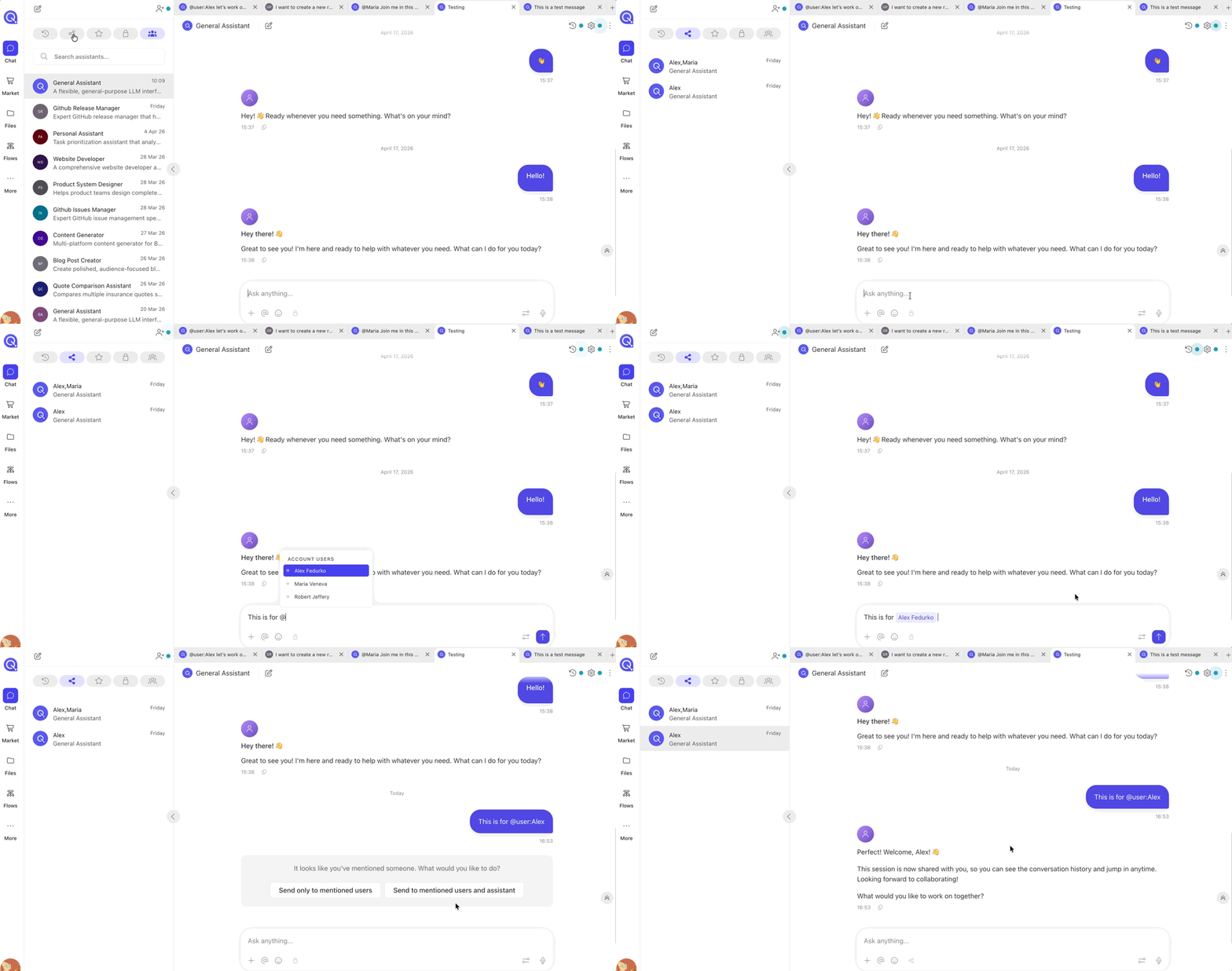
Collaboration just got seamless. You can now invite team members to participate in any assistant session, enabling true collaborative AI-powered workflows.
**How it works:**
* Open an assistant session and mention (@) team members you'd like to collaborate with
* Confirm if you want to notify the AI or just your team members
* Shared members are added instantly and receive notifications
* All collaborators see the same conversation thread and live updates as the assistant works
* Team members can view results, contribute ideas, and track progress in real-time
This is perfect for code reviews with an AI assistant, brainstorming sessions with multiple perspectives, or delegating AI-powered tasks to your team.
### **"Shared With Me" Section**
A new section in your assistant sidebar automatically displays all sessions that have been shared with you. Sessions are:
* **Grouped by participants** – See who's in each session at a glance
* **Organized by assistant** – Easily identify which assistants are involved
* **Updated in real-time** – New shared sessions appear instantly
This makes it simple to jump into collaborative work without hunting through your entire session history.
### **Unread Badges & Smart Notifications**
Never lose track of important updates across your team's shared sessions:
* **Session unread counts** – Each shared session shows a badge (1-9+) indicating new results
* **Member group badges** – Shared groups display cumulative unread counts so you know which collaborations need your attention
* **Automatic updates** – Badges clear as soon as you view a session and update instantly when new results arrive
* **Real-time notifications** – When a team member replies in a shared session, you're notified immediately
Perfect for asynchronous teamwork—work at your own pace while staying informed of important updates.
### **Real-Time Activity Updates**
All session members see updates simultaneously as work happens:
* When an assistant completes a task in a shared session, all members get instant notifications
* Unread counts automatically increment so everyone knows what's new
* Session activity is tracked and visible to all collaborators
## 🛠️ Bug Fixes & Improvements
Simplified and optimized session deletion logic to ensure clean session termination and prevent orphaned sessions in the system.
Fixed mention explanation display in chat components and corrected rendering issues in embedded chat panels for improved stability.
Applied critical fixes from the April 17 production release including chat component refinements and marketplace display corrections.
Enhanced API key permissions configuration for embedded chat deployments, providing more granular control over API access.
Various small fixes and refinements to assistant details display, session management interface, and prompt rendering for improved user experience.
## 📞 Support & Feedback
Explore our comprehensive guides and API documentation.
Join our community for discussions and support.
Need help? Reach out to our support team.
Share your ideas for future features.
***
**Release Date:** April 17, 2026
**Version:** v1.2.0
**Release Type:** Minor Feature Release
# Collaborative Assistant Sessions
We're excited to introduce **collaborative assistant sessions**, enabling you and your team to work together on AI-powered chats in real-time. Share assistant sessions, see live updates as your team works, and stay informed with intelligent notifications—all while enjoying a completely redesigned chat interface built for collaboration. Plus, smarter assistants and improved workflows make your AI-powered work even more efficient.
All existing assistant sessions remain fully functional. The new collaboration features are opt-in — start sharing whenever you're ready by typing @.
## 🎯 Key Highlights
Invite team members to collaborate on assistant conversations in real-time with full session access
View all collaborative sessions in one place, automatically organized by who shared them with you and latest update time
Never miss important results with automatic unread count tracking across all your sessions
Get instant alerts when, AI and team members complete tasks or add results to shared sessions
Improved accessibility, voice input, emoji support, better formatting tools, and more intuitive sidebar
Switch effortlessly between multiple assistant sessions without losing context or progress
## 🤝 Collaborative Features
### **Share Assistant Sessions with Your Team**
Collaboration just got seamless. You can now invite team members to participate in any assistant session, enabling true collaborative AI-powered workflows.
**How it works:**
* Open an assistant session and mention (@) team members you'd like to collaborate with
* Confirm if you want to notify the AI or just your team members
* Shared members are added instantly and receive notifications
* All collaborators see the same conversation thread and live updates as the assistant works
* Team members can view results, contribute ideas, and track progress in real-time
This is perfect for code reviews with an AI assistant, brainstorming sessions with multiple perspectives, or delegating AI-powered tasks to your team.
### **"Shared With Me" Section**
A new section in your assistant sidebar automatically displays all sessions that have been shared with you. Sessions are:
* **Grouped by participants** – See who's in each session at a glance
* **Organized by assistant** – Easily identify which assistants are involved
* **Updated in real-time** – New shared sessions appear instantly
This makes it simple to jump into collaborative work without hunting through your entire session history.
### **Unread Badges & Smart Notifications**
Never lose track of important updates across your team's shared sessions:
* **Session unread counts** – Each shared session shows a badge (1-9+) indicating new results
* **Member group badges** – Shared groups display cumulative unread counts so you know which collaborations need your attention
* **Automatic updates** – Badges clear as soon as you view a session and update instantly when new results arrive
* **Real-time notifications** – When a team member replies in a shared session, you're notified immediately
Perfect for asynchronous teamwork—work at your own pace while staying informed of important updates.
### **Real-Time Activity Updates**
All session members see updates simultaneously as work happens:
* When an assistant completes a task in a shared session, all members get instant notifications
* Unread counts automatically increment so everyone knows what's new
* Session activity is tracked and visible to all collaborators
 ***
## 🎨 Chat Interface Redesign
### **UI/UX Enhancements Overview**
We've completely redesigned the chat interface for better usability, accessibility, and collaboration. Below are the major visual and functional improvements:
#### **Improved Accessibility**
The interface has been optimized for clarity and comfort:
***
## 🎨 Chat Interface Redesign
### **UI/UX Enhancements Overview**
We've completely redesigned the chat interface for better usability, accessibility, and collaboration. Below are the major visual and functional improvements:
#### **Improved Accessibility**
The interface has been optimized for clarity and comfort:
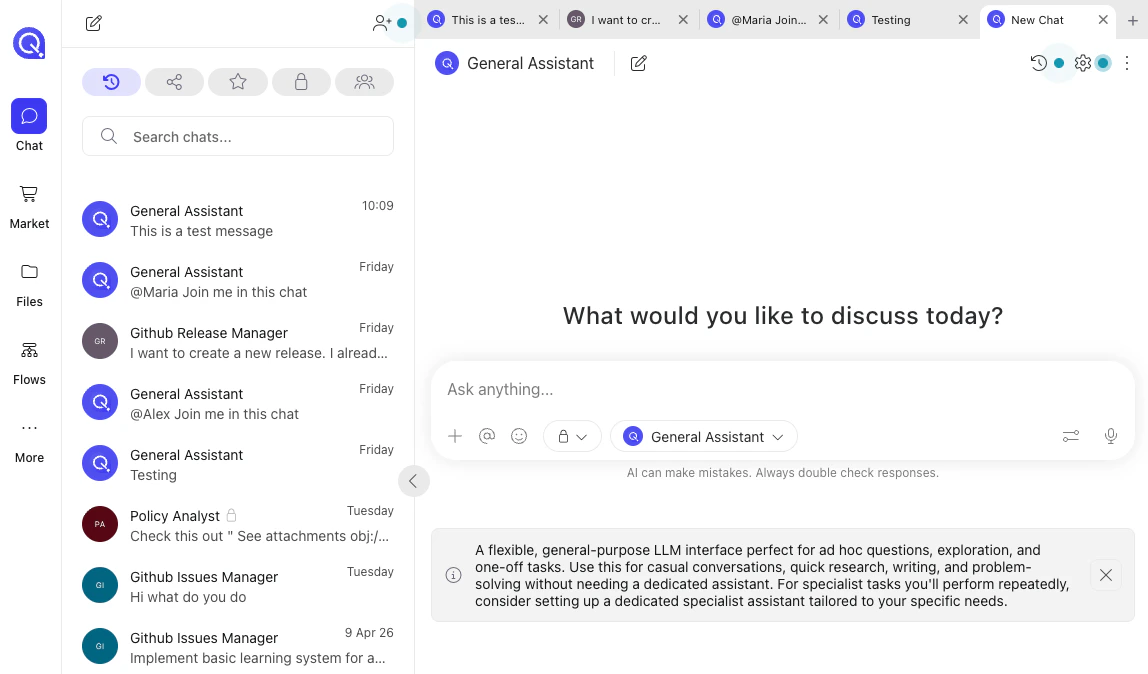 * **Enhanced Typography** – Refined font sizes and weights throughout for better readability
* **Improved Color Contrast** – Updated background colors and contrast ratios to meet accessibility standards, reducing eye strain
* **Better Visual Hierarchy** – Clearer spacing and organization of sidebar sections for easier navigation
* **Refined Sidebar Layout** – Completely reorganized with clear sections for Favorites, Personal assistants, Team assistants, and Shared sessions
#### **Voice-to-Text Input**
Hands-free interaction is now available on compatible devices:
* **Enhanced Typography** – Refined font sizes and weights throughout for better readability
* **Improved Color Contrast** – Updated background colors and contrast ratios to meet accessibility standards, reducing eye strain
* **Better Visual Hierarchy** – Clearer spacing and organization of sidebar sections for easier navigation
* **Refined Sidebar Layout** – Completely reorganized with clear sections for Favorites, Personal assistants, Team assistants, and Shared sessions
#### **Voice-to-Text Input**
Hands-free interaction is now available on compatible devices:
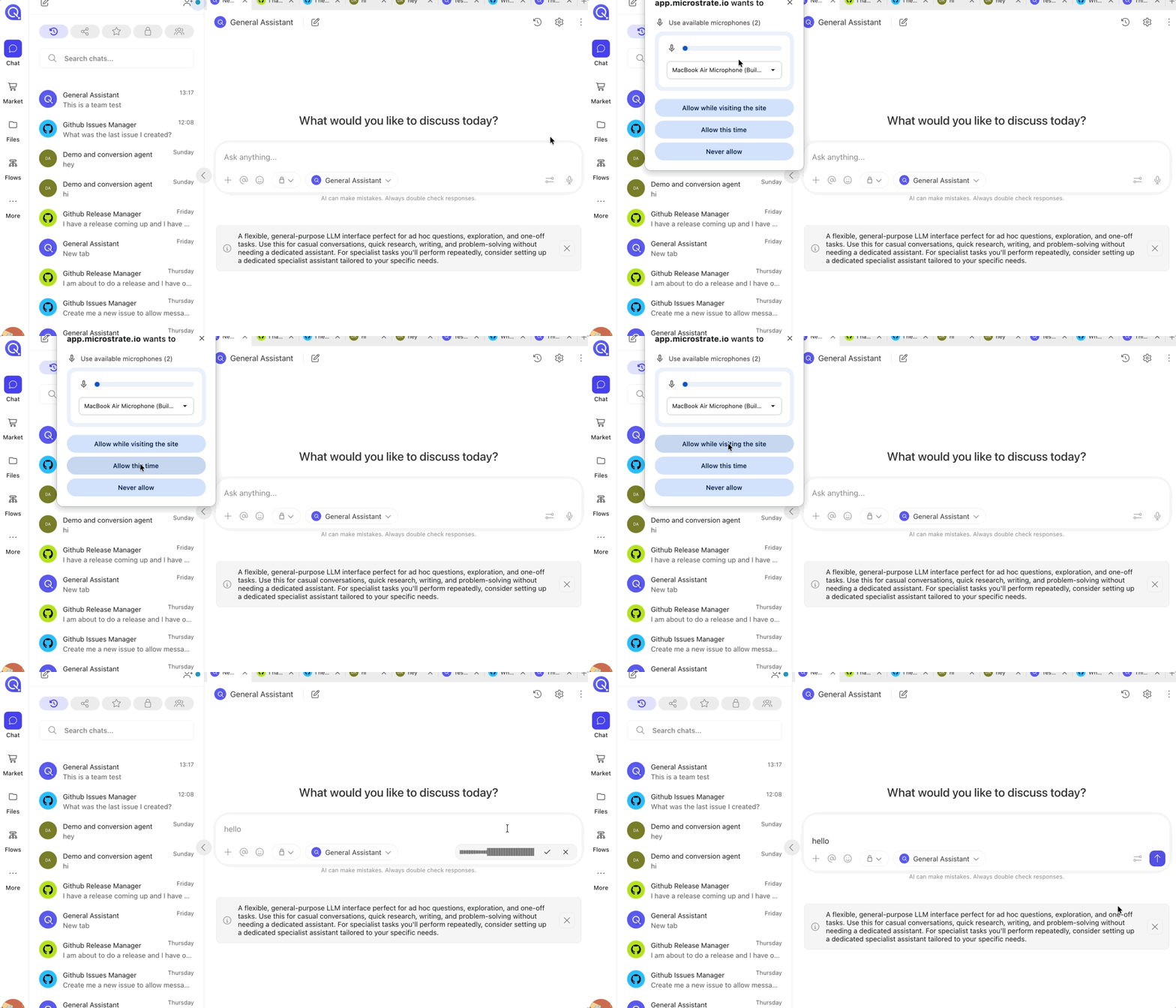 * Click the **microphone icon** in the chat input box to start recording
* Speak your prompt naturally
* Your words appear in real-time as you speak
* Perfect for quick prompts, multitasking, or when typing isn't convenient
* Works on browsers and devices that support voice recognition APIs
#### **Emoji Support in Chat**
Add personality and clarity to your conversations:
* Click the **microphone icon** in the chat input box to start recording
* Speak your prompt naturally
* Your words appear in real-time as you speak
* Perfect for quick prompts, multitasking, or when typing isn't convenient
* Works on browsers and devices that support voice recognition APIs
#### **Emoji Support in Chat**
Add personality and clarity to your conversations:
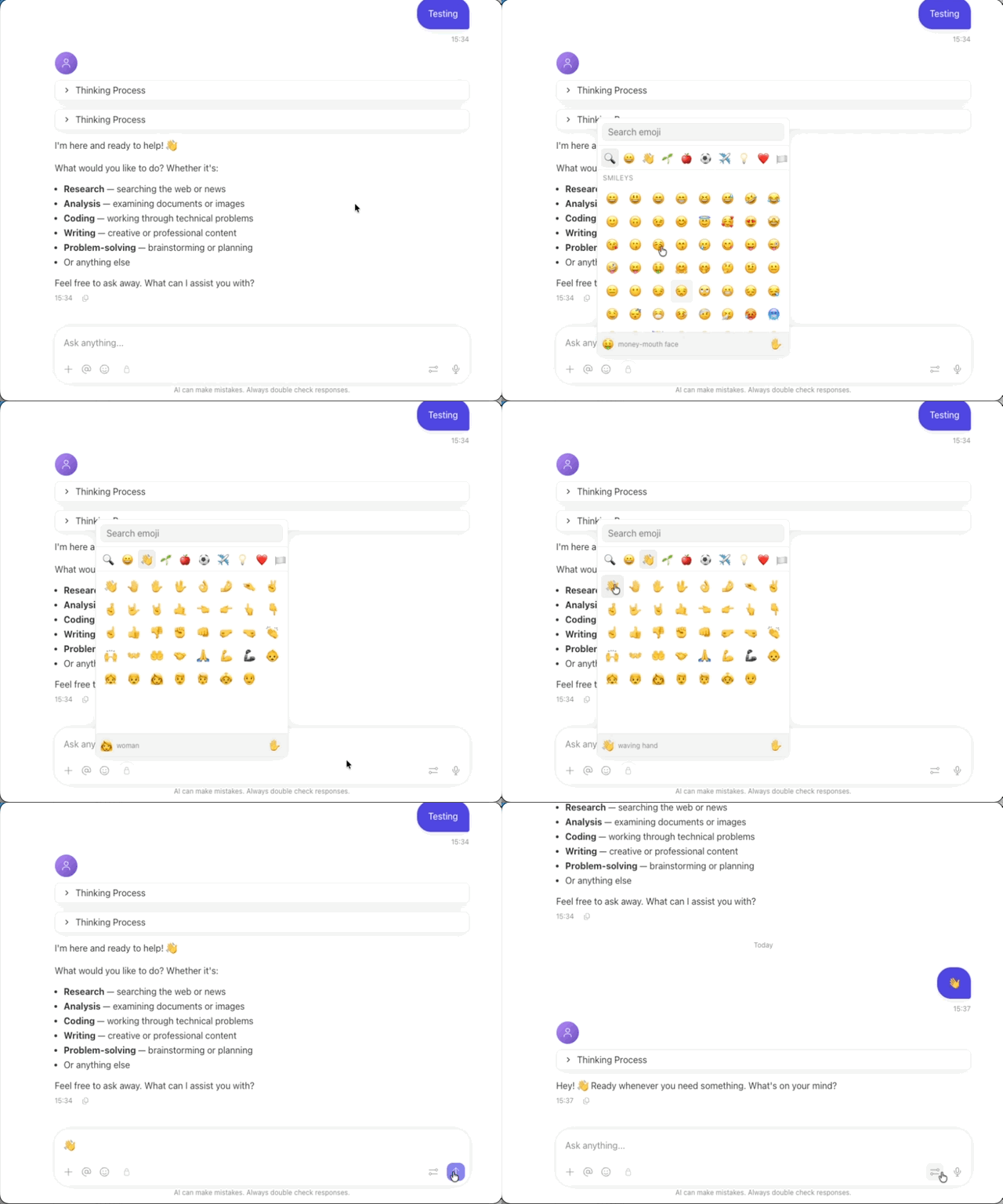 * Use the **emoji icon** in the chat toolbar to browse and insert emojis
* Emojis appear naturally in your messages and the assistant's responses
* Great for adding tone, reactions, and visual markers to conversations
* Supported throughout the entire chat interface
#### **Better Formatting Tools**
The chat input area now includes enhanced formatting controls:
* Use the **emoji icon** in the chat toolbar to browse and insert emojis
* Emojis appear naturally in your messages and the assistant's responses
* Great for adding tone, reactions, and visual markers to conversations
* Supported throughout the entire chat interface
#### **Better Formatting Tools**
The chat input area now includes enhanced formatting controls:
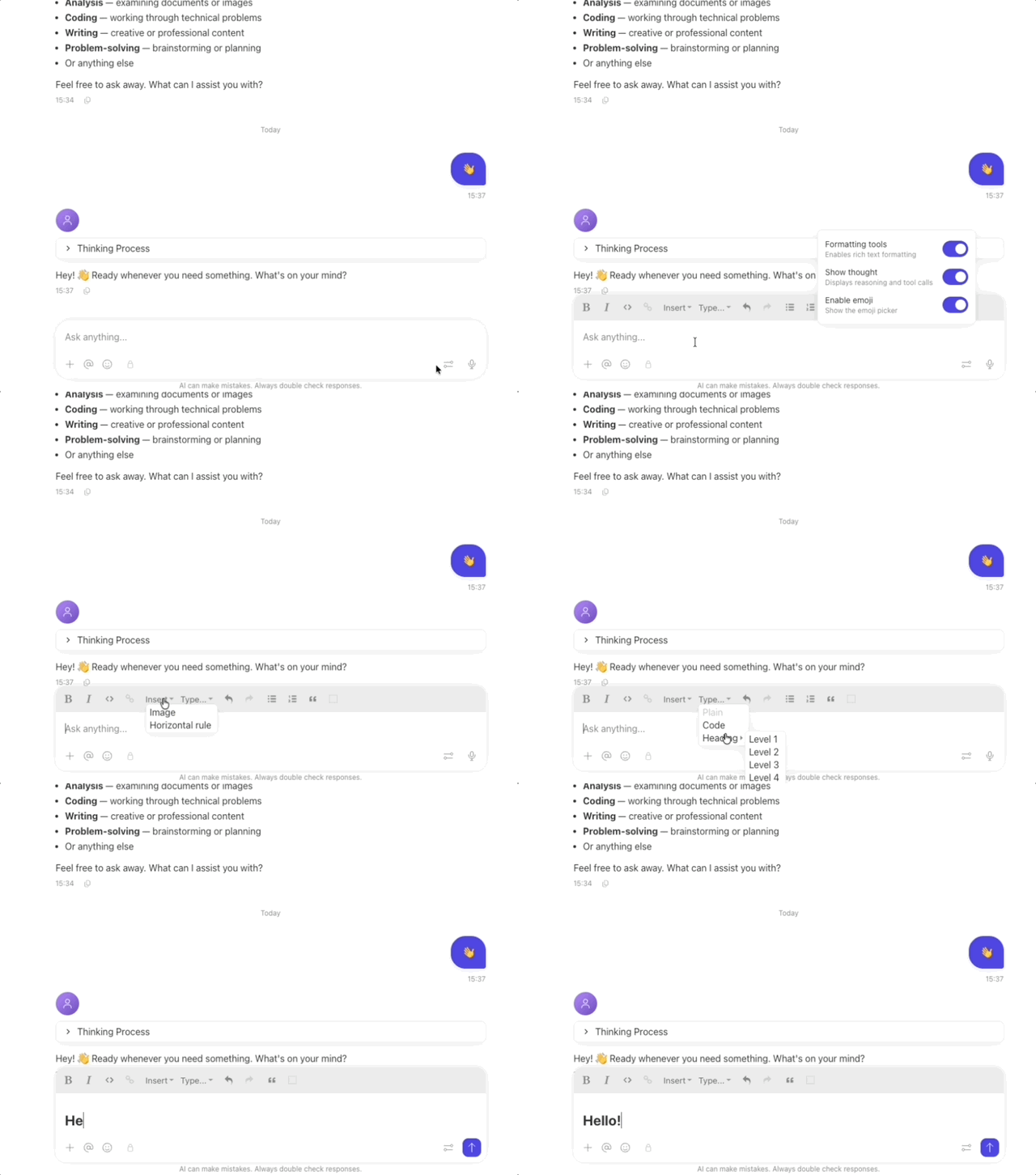 * **Rich text formatting** – Bold, italic, underline, and code formatting directly in the chat box
* **Format with markdown** - use markdown syntax to automatically format without needing to use the toolbar
* **File attachments** – Click the **+ icon** to upload files and images
* **Cleaner toolbar** – All tools are organized intuitively for faster composition
#### **Global Tabs**
Multitasking just became easier:
* **Rich text formatting** – Bold, italic, underline, and code formatting directly in the chat box
* **Format with markdown** - use markdown syntax to automatically format without needing to use the toolbar
* **File attachments** – Click the **+ icon** to upload files and images
* **Cleaner toolbar** – All tools are organized intuitively for faster composition
#### **Global Tabs**
Multitasking just became easier:
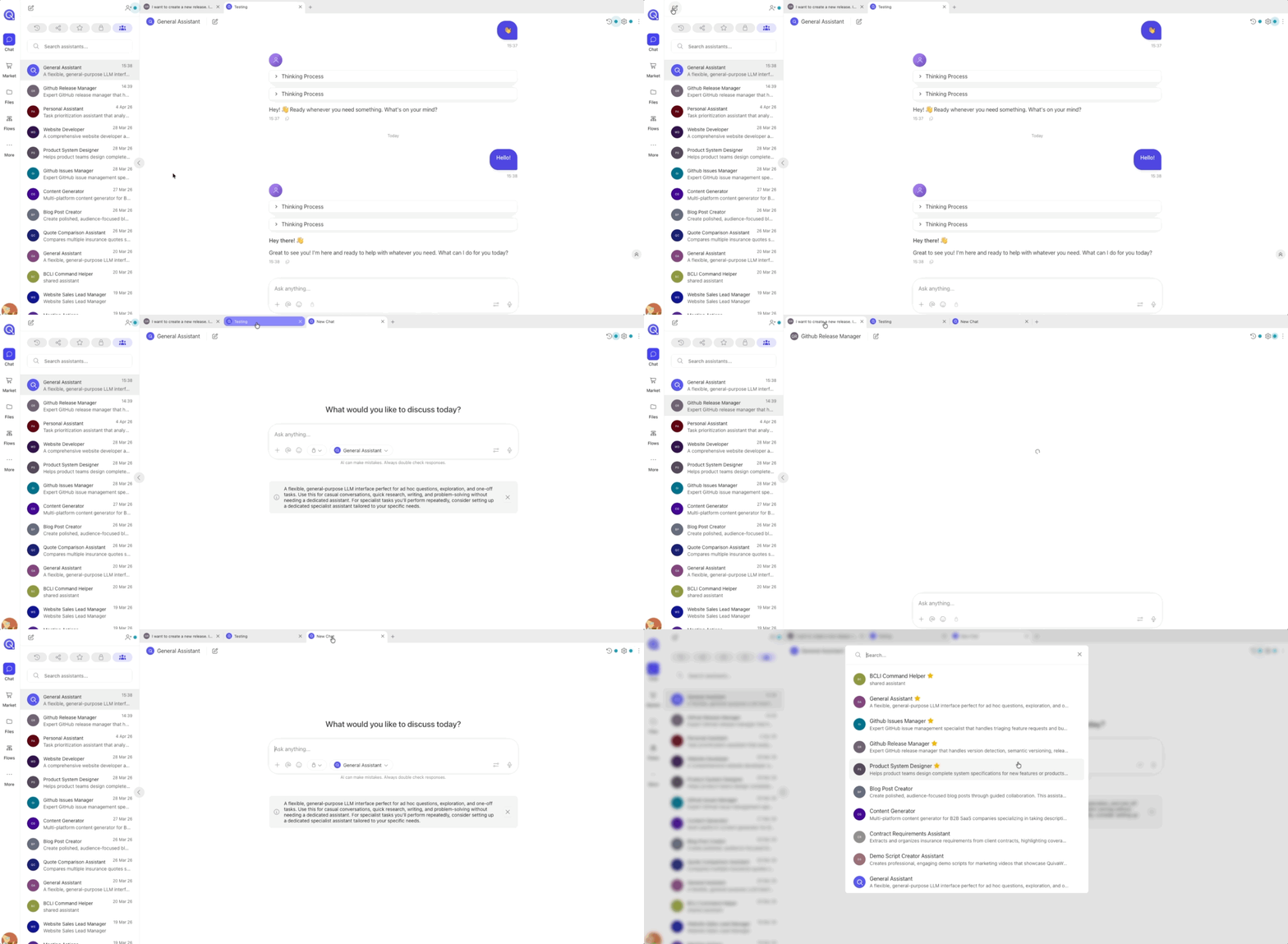 * **Open multiple sessions** – Tabs appear at the top of the workspace for each open assistant session
* **Easy switching** – Click any tab to jump to that conversation without losing context
* **Workspace scope** – Tabs are now global across your workspace (not limited to individual assistants)
* **Visual indicators** – Each tab shows the assistant name and unread message count
* **Perfect for multitasking** – Compare outputs, work on parallel tasks, or reference previous sessions while using a current one
#### **Redesigned Sidebar**
The sidebar is completely restructured for better organization:
* **Open multiple sessions** – Tabs appear at the top of the workspace for each open assistant session
* **Easy switching** – Click any tab to jump to that conversation without losing context
* **Workspace scope** – Tabs are now global across your workspace (not limited to individual assistants)
* **Visual indicators** – Each tab shows the assistant name and unread message count
* **Perfect for multitasking** – Compare outputs, work on parallel tasks, or reference previous sessions while using a current one
#### **Redesigned Sidebar**
The sidebar is completely restructured for better organization:
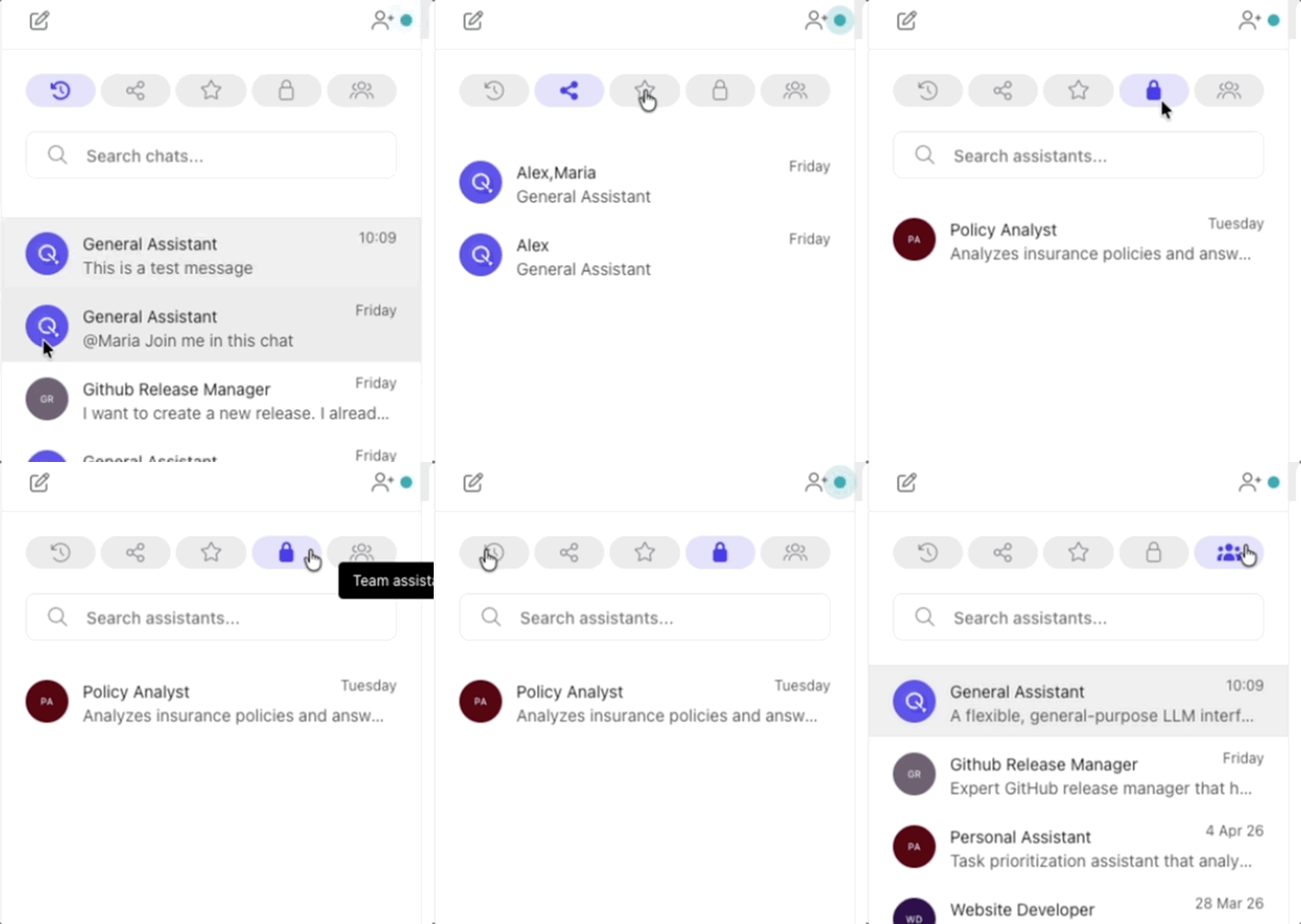 * **Global new chat button** – Start a new general chat by clicking this button from anywhere in the chat interface
* **Favorites section** – Pin your most-used assistants for quick access
* **Personal assistants** – All your private assistant sessions in one place
* **Team assistants** – Assistants shared with your team
* **Shared With Me** – New section showing collaborative sessions grouped by owner
* **Better scrolling** – Cleaner layout with less visual clutter
* **Unread indicators** – Badges show which assistants and shared sessions have new activity
#### **Redesigned Chat Prompt**
The chat prompt has been redesigned for better functionality and to work with our new features:
* **Global new chat button** – Start a new general chat by clicking this button from anywhere in the chat interface
* **Favorites section** – Pin your most-used assistants for quick access
* **Personal assistants** – All your private assistant sessions in one place
* **Team assistants** – Assistants shared with your team
* **Shared With Me** – New section showing collaborative sessions grouped by owner
* **Better scrolling** – Cleaner layout with less visual clutter
* **Unread indicators** – Badges show which assistants and shared sessions have new activity
#### **Redesigned Chat Prompt**
The chat prompt has been redesigned for better functionality and to work with our new features:
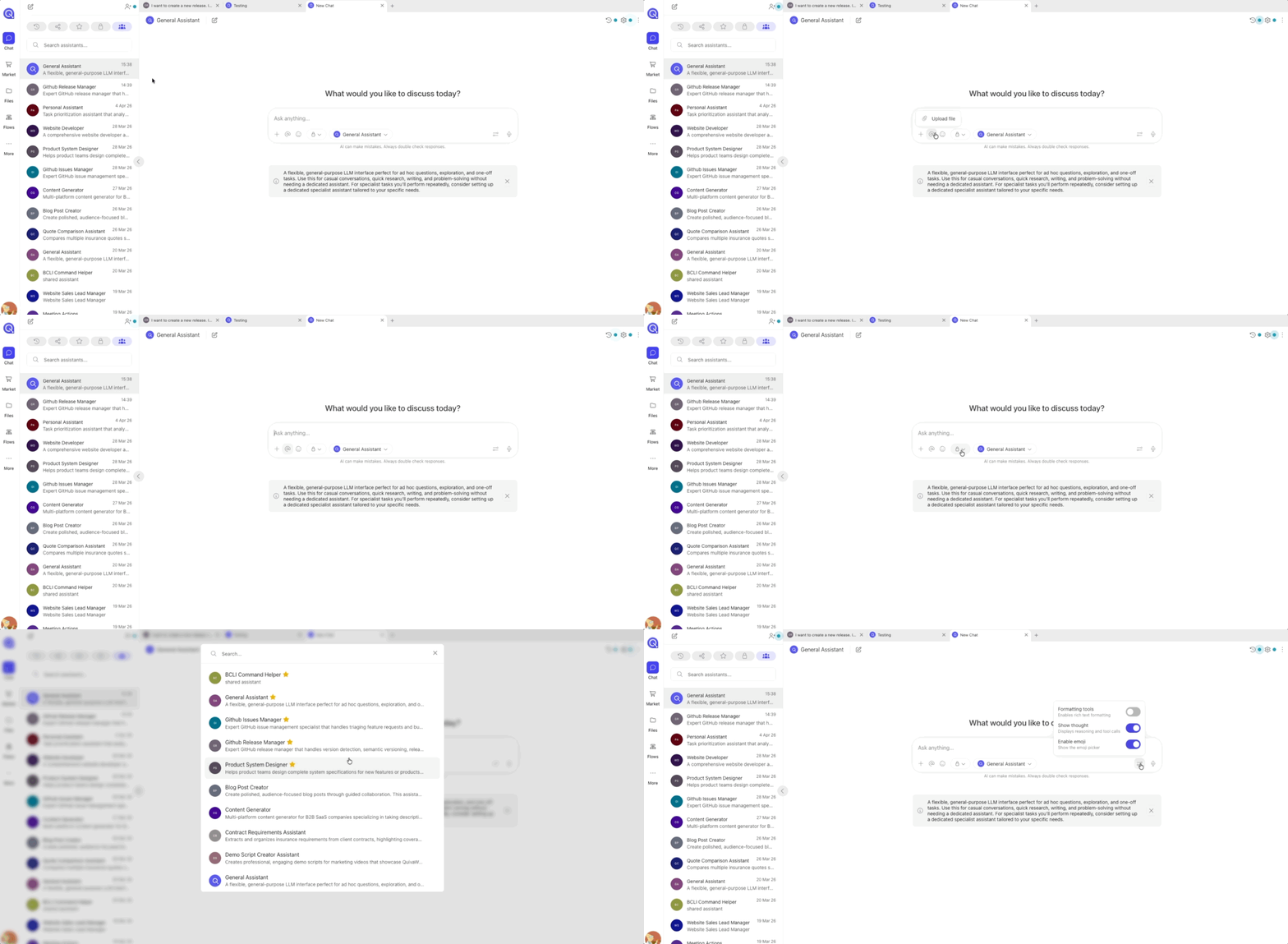 * **@mention** – Click this button or type @ to find and select your team mate to add to the session
* **Emojis** – Use emojis in chat with AI and your team mates
* **Lock Icon** – Allows selecting between private and team visible chats
* **Assistant selection** – Switch the assistant you are wanting to work with easily right in the chat prompt
* **Tools actions** – Turn on/off the formatting toolbar, emojis, and detailed chat output
* **Microphone** – Click to use speech to text. This option disappears once you start typing in the prompt box
***
## ✨ Improvements
Your assistants are now more efficient and capable:
Plan selection now works flawlessly on mobile devices with an optimized interface that adapts to smaller screens. Your assistants respond better to mobile interactions, making AI-powered work accessible on the go.
Assistants can now execute complex API requests with greater reliability. Fixed handling of special numeric formats and improved request processing ensures your tools work correctly every time.
Your assistants now default to fast, efficient processing modes without sacrificing quality. Sub-agents operate with optimized settings for quicker responses while maintaining accuracy.
Assistants better understand and apply context from tools and shared knowledge, leading to more relevant and accurate responses across your workflows.
***
## 📋 Additional Improvements
Updated color schemes throughout the interface for better dark mode support, reducing eye strain during extended use
Improved tab switching and session loading for a snappier, more responsive experience when working with multiple conversations
Enhanced how messages are rendered with better formatting support, improved planning visualization, and cleaner message layout
New notification audio and visual indicators to alert you when team members update shared sessions or complete important tasks
Email-triggered workflows now handle file attachments more reliably, preserving file information for better knowledge management
***
## 📞 Support & Feedback
Learn more about collaborative features and how to use the new interface
Connect with other users and share your experience with the new collaborative features
Have questions? Reach out to our support team anytime
Love the new interface? Have suggestions? We'd love to hear from you
***
**Release Date:** March 27, 2026
**Version:** v1.1.4 – Patch Release
**Release Type:** Maintenance & Improvements
# QuivaWorks v1.1.4 – Enhanced Flows, Marketplace, & Chat Experience
This patch release focuses on critical bug fixes and user experience improvements without any breaking changes. All existing workflows and Assistants remain fully compatible.
## 🎯 Key Highlights
Add HTTP endpoints and QuivaWorks services to your flows with OpenAPI spec support
Enhanced search, categorization, and featured products for easier discovery
Sub-agents now automatically receive documents and conversation context
Improved code block and table support with better copy/paste handling
## ✨ What's New
### Service Functions for Flows
Your flows now have enhanced support for **HTTP endpoints** and **QuivaWorks service invocations**, opening up new automation possibilities. Drag-and-drop HTTP request nodes and endpoint services into your flow builders alongside agents, conditions, and delays.
**Capabilities include:**
* **HTTP Request Node** – Call REST APIs with full authentication support (Bearer, Basic, API Key)
* **QuivaWorks Endpoint Node** – Invoke OpenAPI-compliant services with automatic schema conversion
* **Delay Node** – Add pauses and timing control to your workflows
* **Rules Node** – Implement conditional logic based on payload data
All nodes work seamlessly with the existing flow architecture—build complex multi-step automations without leaving the visual builder.
***
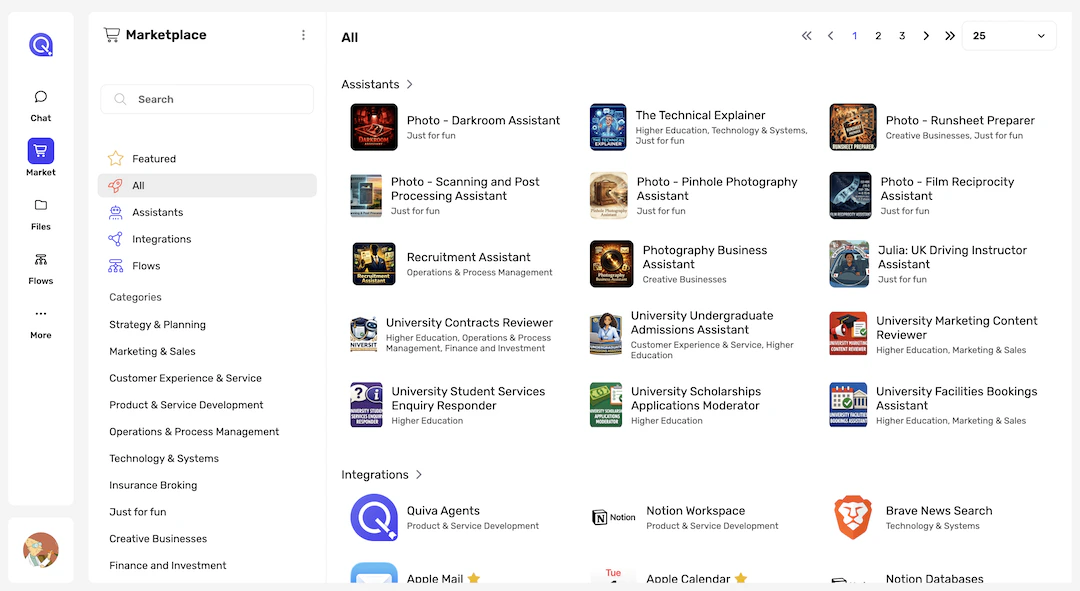
### Marketplace Overhaul
The marketplace has been completely redesigned with your feedback in mind:
* **Smarter Search** – Faster, debounced search with instant result filtering
* **Better Categorization** – Products now organized by type with improved browsing
* **Featured Section** – Discover hand-picked products and top-rated agents
* **Mobile-Optimized** – Responsive design works beautifully on all devices
* **Product Previews** – Enhanced "About" tabs with rich descriptions and requirements
Discovering and installing Assistants, flows, and integrations is now faster and more intuitive.
* **@mention** – Click this button or type @ to find and select your team mate to add to the session
* **Emojis** – Use emojis in chat with AI and your team mates
* **Lock Icon** – Allows selecting between private and team visible chats
* **Assistant selection** – Switch the assistant you are wanting to work with easily right in the chat prompt
* **Tools actions** – Turn on/off the formatting toolbar, emojis, and detailed chat output
* **Microphone** – Click to use speech to text. This option disappears once you start typing in the prompt box
***
## ✨ Improvements
Your assistants are now more efficient and capable:
Plan selection now works flawlessly on mobile devices with an optimized interface that adapts to smaller screens. Your assistants respond better to mobile interactions, making AI-powered work accessible on the go.
Assistants can now execute complex API requests with greater reliability. Fixed handling of special numeric formats and improved request processing ensures your tools work correctly every time.
Your assistants now default to fast, efficient processing modes without sacrificing quality. Sub-agents operate with optimized settings for quicker responses while maintaining accuracy.
Assistants better understand and apply context from tools and shared knowledge, leading to more relevant and accurate responses across your workflows.
***
## 📋 Additional Improvements
Updated color schemes throughout the interface for better dark mode support, reducing eye strain during extended use
Improved tab switching and session loading for a snappier, more responsive experience when working with multiple conversations
Enhanced how messages are rendered with better formatting support, improved planning visualization, and cleaner message layout
New notification audio and visual indicators to alert you when team members update shared sessions or complete important tasks
Email-triggered workflows now handle file attachments more reliably, preserving file information for better knowledge management
***
## 📞 Support & Feedback
Learn more about collaborative features and how to use the new interface
Connect with other users and share your experience with the new collaborative features
Have questions? Reach out to our support team anytime
Love the new interface? Have suggestions? We'd love to hear from you
***
**Release Date:** March 27, 2026
**Version:** v1.1.4 – Patch Release
**Release Type:** Maintenance & Improvements
# QuivaWorks v1.1.4 – Enhanced Flows, Marketplace, & Chat Experience
This patch release focuses on critical bug fixes and user experience improvements without any breaking changes. All existing workflows and Assistants remain fully compatible.
## 🎯 Key Highlights
Add HTTP endpoints and QuivaWorks services to your flows with OpenAPI spec support
Enhanced search, categorization, and featured products for easier discovery
Sub-agents now automatically receive documents and conversation context
Improved code block and table support with better copy/paste handling
## ✨ What's New
### Service Functions for Flows
Your flows now have enhanced support for **HTTP endpoints** and **QuivaWorks service invocations**, opening up new automation possibilities. Drag-and-drop HTTP request nodes and endpoint services into your flow builders alongside agents, conditions, and delays.
**Capabilities include:**
* **HTTP Request Node** – Call REST APIs with full authentication support (Bearer, Basic, API Key)
* **QuivaWorks Endpoint Node** – Invoke OpenAPI-compliant services with automatic schema conversion
* **Delay Node** – Add pauses and timing control to your workflows
* **Rules Node** – Implement conditional logic based on payload data
All nodes work seamlessly with the existing flow architecture—build complex multi-step automations without leaving the visual builder.
***
### Marketplace Overhaul
The marketplace has been completely redesigned with your feedback in mind:
* **Smarter Search** – Faster, debounced search with instant result filtering
* **Better Categorization** – Products now organized by type with improved browsing
* **Featured Section** – Discover hand-picked products and top-rated agents
* **Mobile-Optimized** – Responsive design works beautifully on all devices
* **Product Previews** – Enhanced "About" tabs with rich descriptions and requirements
Discovering and installing Assistants, flows, and integrations is now faster and more intuitive.
 ***
### Sub-Agent Context Sharing
Sub-agents now inherit conversation context from their parent agents automatically. When a sub-agent is invoked, it receives:
* **Document References** – All files and attachments from the parent conversation
* **Topic Summaries** – Recent conversation context to maintain continuity
* **No Performance Overhead** – Context is deterministically extracted with minimal token usage
This eliminates the context loss problem where sub-agents had no knowledge of documents referenced in the main conversation. Perfect for multi-agent orchestrations and team workflows.
***
### Editor Improvements
Your writing experience is now smoother:
* **Better Code Blocks** – Paste code snippets with fewer formatting issues
* **Table Support** – Create and edit tables directly in the editor
* **Smarter Paste** – Markdown content now pastes with correct indentation and formatting
* **Cleaner Output** – Non-breaking spaces in code blocks are automatically cleaned
Especially useful when copying documentation, code examples, or formatted content from external sources.
***
## 🛠️ Bug Fixes & Improvements
Fixed password manager compatibility by adding proper form hints. Login and sign-up forms now work correctly with browser password managers and autocomplete features.
Resolved an issue where chat views weren't properly restoring previous sessions. Chat interface now loads cleanly without unexpected UI glitches.
Fixed critical issues in agent stream handling, including proper cleanup of resources and graceful handling of user cancellations. Invoking sub-agents is now more reliable and prevents memory leaks.
Improved handling of shared agents and recipes. Ownership and sharing preferences are now properly maintained when downloading from the marketplace.
## 📞 Support & Feedback
Explore flow builder guides and service integration tutorials
Chat with other users and get quick help
Tell us what you'd like to build next
Contact our support team for assistance
***
**Release Date:** March 20, 2026\
**Version:** v1.1.3\
**Release Type:** Patch Release
# QuivaWorks v1.1.3 – Enhanced Productivity & User Experience
v1.1.3 delivers powerful new features for instruction editing, knowledge management, and user onboarding. This patch brings context-aware suggestions, comprehensive file previews, customizable welcome messages, and an interactive guided experience to accelerate your workflow.
This release is fully backward compatible—no breaking changes or migration steps required.
## 🎯 Key Highlights
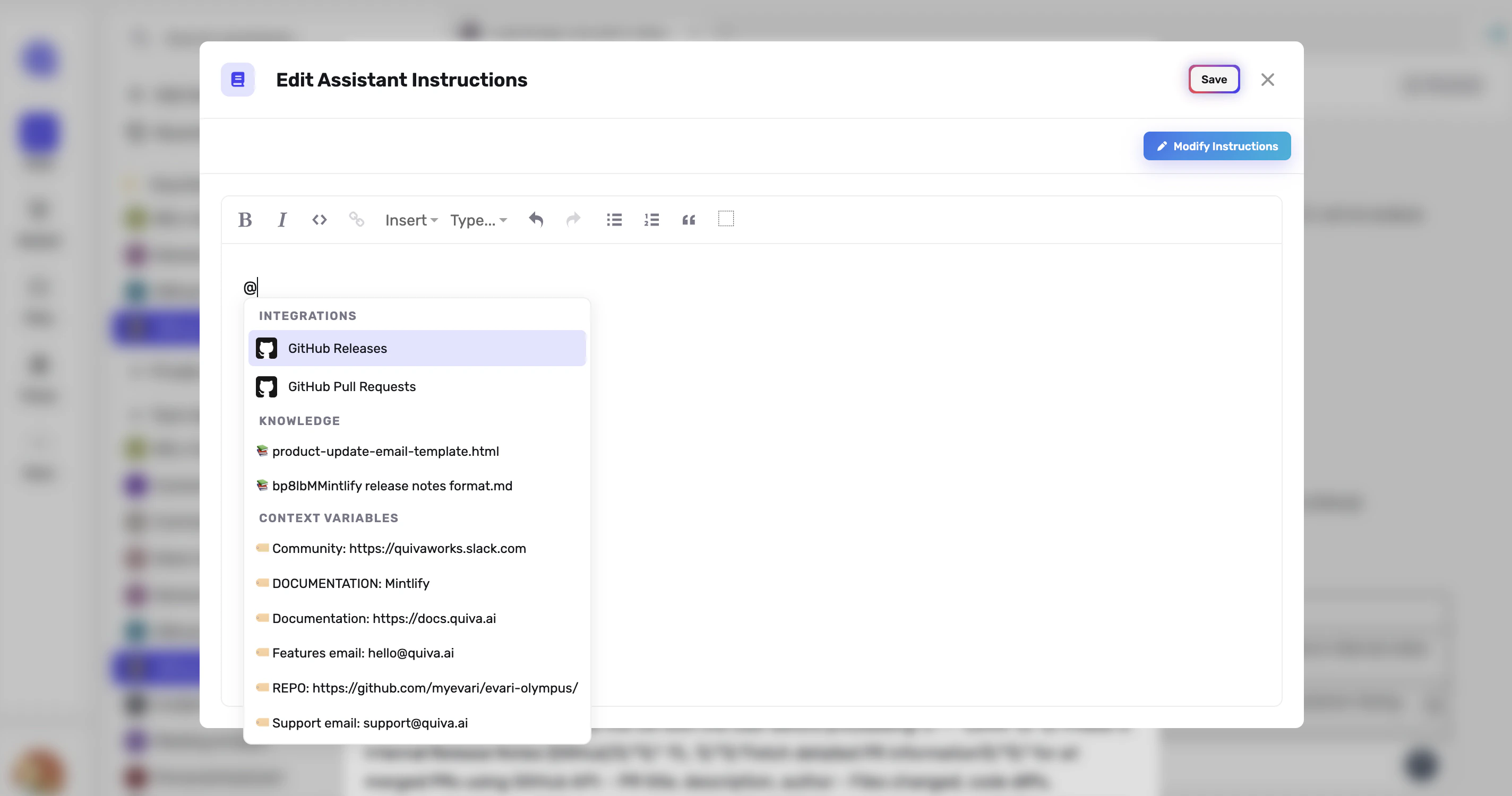
Reference available context variables directly in instruction suggestions with visual indicators by typing @
Rich text editing with automatic formatting, code blocks, and keyboard shortcuts
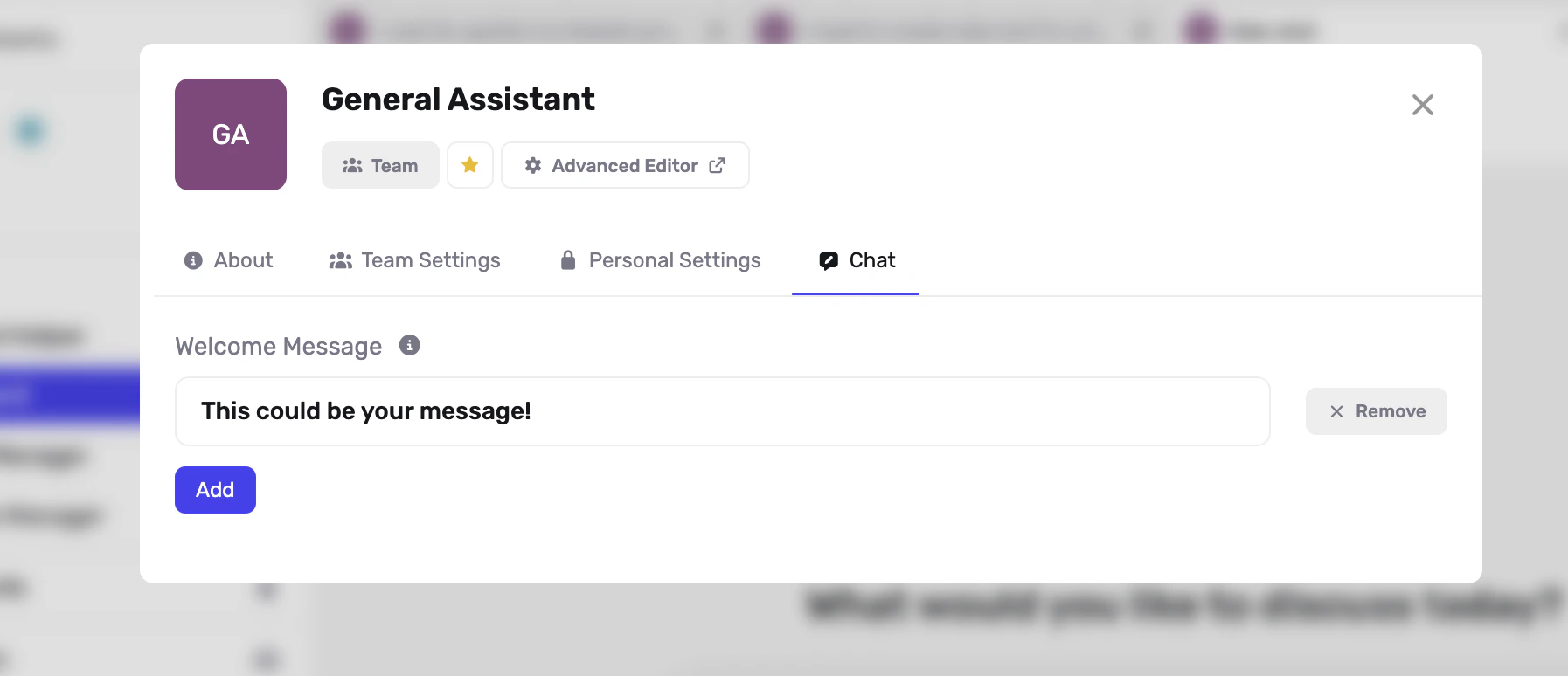
Create personalized greeting messages that display on a new chat engage users
Preview images, documents, and files directly in your knowledge base and as attachments
Sort and filter files by name, type, and size with auto-scroll to new uploads
Guided tours with animated hotspots help new users discover key features
## ✨ What's New
### Context Variables in Autocomplete
Instruction suggestions now include available context variables alongside knowledge resources and acceptance criteria. Visual indicators (🏷️ for variables, 📚 for knowledge, ✅ for criteria) make it easy to find what you need. The autocomplete dropdown is larger, showing more options at once. To trigger, simply type @ when editing your instructions.
***
### Sub-Agent Context Sharing
Sub-agents now inherit conversation context from their parent agents automatically. When a sub-agent is invoked, it receives:
* **Document References** – All files and attachments from the parent conversation
* **Topic Summaries** – Recent conversation context to maintain continuity
* **No Performance Overhead** – Context is deterministically extracted with minimal token usage
This eliminates the context loss problem where sub-agents had no knowledge of documents referenced in the main conversation. Perfect for multi-agent orchestrations and team workflows.
***
### Editor Improvements
Your writing experience is now smoother:
* **Better Code Blocks** – Paste code snippets with fewer formatting issues
* **Table Support** – Create and edit tables directly in the editor
* **Smarter Paste** – Markdown content now pastes with correct indentation and formatting
* **Cleaner Output** – Non-breaking spaces in code blocks are automatically cleaned
Especially useful when copying documentation, code examples, or formatted content from external sources.
***
## 🛠️ Bug Fixes & Improvements
Fixed password manager compatibility by adding proper form hints. Login and sign-up forms now work correctly with browser password managers and autocomplete features.
Resolved an issue where chat views weren't properly restoring previous sessions. Chat interface now loads cleanly without unexpected UI glitches.
Fixed critical issues in agent stream handling, including proper cleanup of resources and graceful handling of user cancellations. Invoking sub-agents is now more reliable and prevents memory leaks.
Improved handling of shared agents and recipes. Ownership and sharing preferences are now properly maintained when downloading from the marketplace.
## 📞 Support & Feedback
Explore flow builder guides and service integration tutorials
Chat with other users and get quick help
Tell us what you'd like to build next
Contact our support team for assistance
***
**Release Date:** March 20, 2026\
**Version:** v1.1.3\
**Release Type:** Patch Release
# QuivaWorks v1.1.3 – Enhanced Productivity & User Experience
v1.1.3 delivers powerful new features for instruction editing, knowledge management, and user onboarding. This patch brings context-aware suggestions, comprehensive file previews, customizable welcome messages, and an interactive guided experience to accelerate your workflow.
This release is fully backward compatible—no breaking changes or migration steps required.
## 🎯 Key Highlights
Reference available context variables directly in instruction suggestions with visual indicators by typing @
Rich text editing with automatic formatting, code blocks, and keyboard shortcuts
Create personalized greeting messages that display on a new chat engage users
Preview images, documents, and files directly in your knowledge base and as attachments
Sort and filter files by name, type, and size with auto-scroll to new uploads
Guided tours with animated hotspots help new users discover key features
## ✨ What's New
### Context Variables in Autocomplete
Instruction suggestions now include available context variables alongside knowledge resources and acceptance criteria. Visual indicators (🏷️ for variables, 📚 for knowledge, ✅ for criteria) make it easy to find what you need. The autocomplete dropdown is larger, showing more options at once. To trigger, simply type @ when editing your instructions.
 ### Enhanced Markdown Editing Experience
Create richer content with a new editor for instructions and readme fields. Supports keyboard shortcuts (Shift+Enter, Mod+Enter, Alt+Enter), automatic code block creation with triple backticks, and inline formatting for bold, italic, and code snippets.
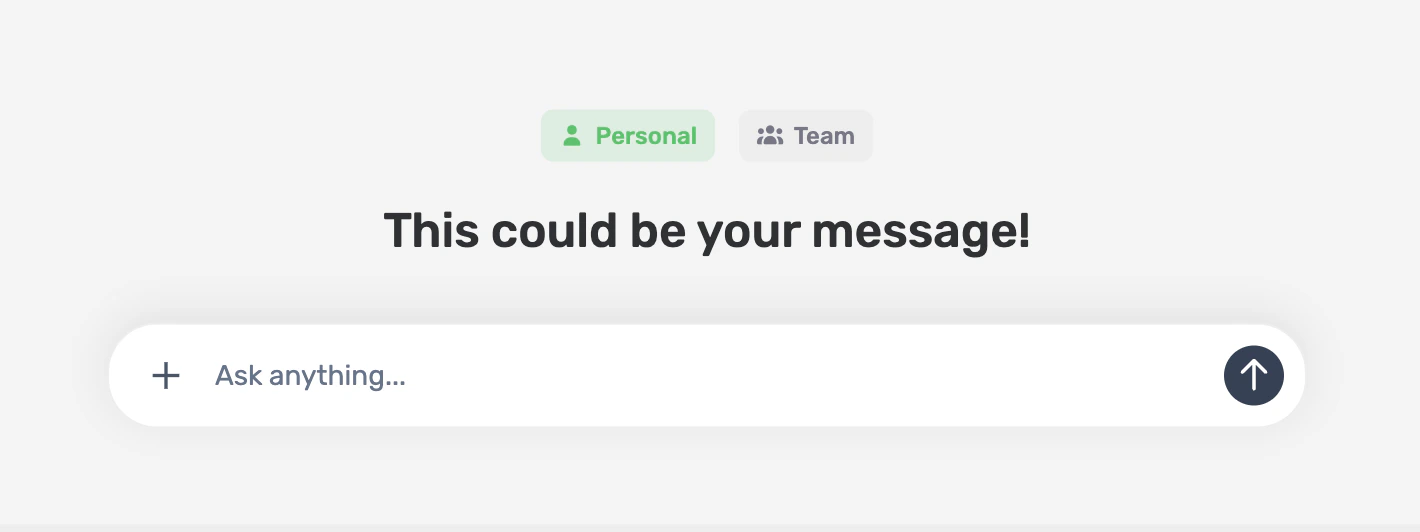
### Customizable Welcome Messages
Welcome your users with personalized greetings. Configure multiple welcome messages that display randomly to create engaging first impressions. Full configuration UI integrated into agent settings.
### Enhanced Markdown Editing Experience
Create richer content with a new editor for instructions and readme fields. Supports keyboard shortcuts (Shift+Enter, Mod+Enter, Alt+Enter), automatic code block creation with triple backticks, and inline formatting for bold, italic, and code snippets.
### Customizable Welcome Messages
Welcome your users with personalized greetings. Configure multiple welcome messages that display randomly to create engaging first impressions. Full configuration UI integrated into agent settings.
 ### Comprehensive File Preview System
Preview Word documents, Excel spreadsheets, PDFs, images, and more directly in your workflow. Intelligent file icons adapt to your theme. New file path visualization makes navigation intuitive. Open URI-based knowledge items directly from the interface.
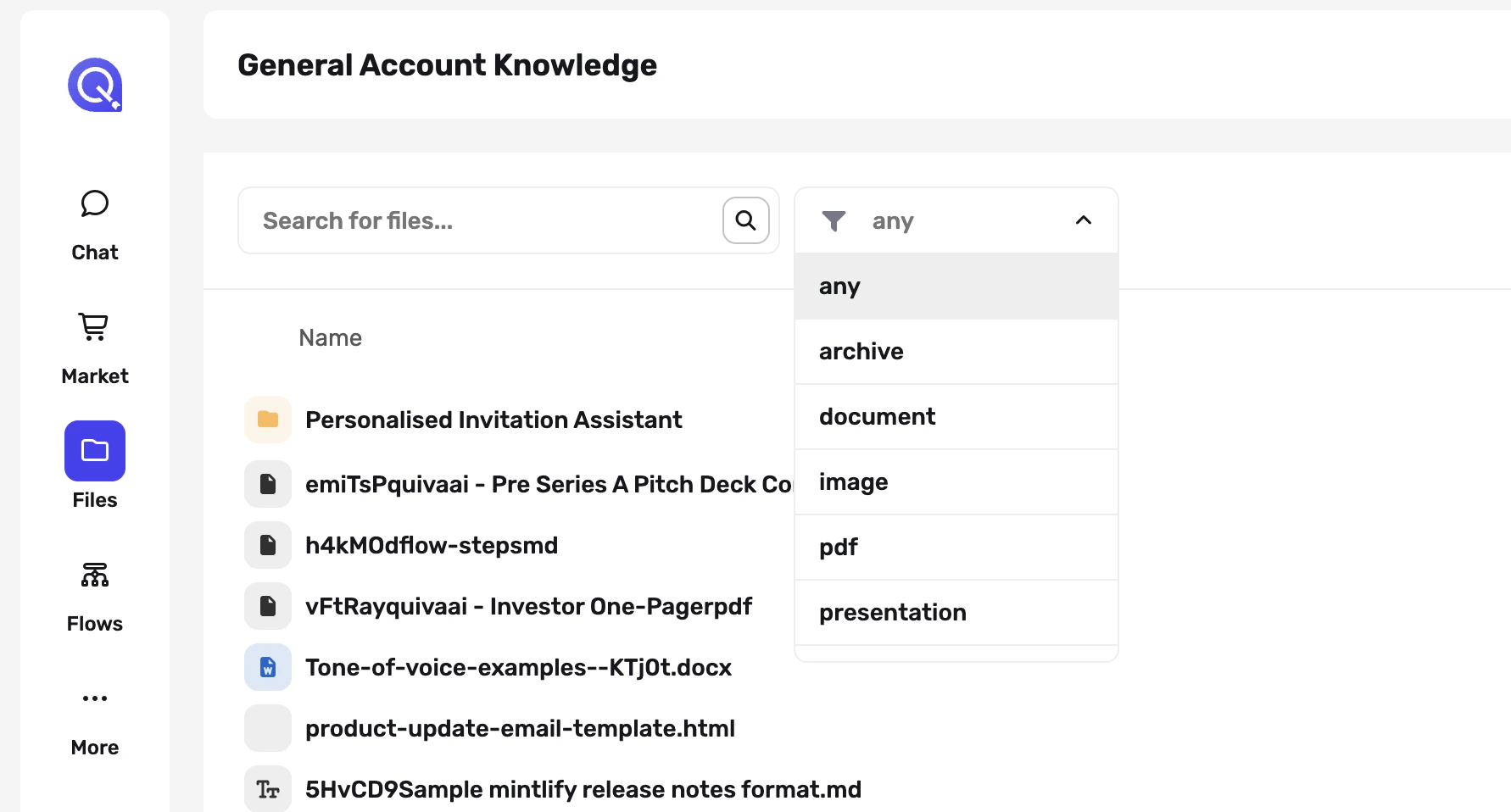
### Knowledge Sorting & Filtering
Organize your knowledge base efficiently with multiple sorting options (by name, type, or file size) and filtering by document categories. New files highlight and auto-scroll into view after upload. Search and filter controls remain visible while scrolling through large collections.
### Comprehensive File Preview System
Preview Word documents, Excel spreadsheets, PDFs, images, and more directly in your workflow. Intelligent file icons adapt to your theme. New file path visualization makes navigation intuitive. Open URI-based knowledge items directly from the interface.
### Knowledge Sorting & Filtering
Organize your knowledge base efficiently with multiple sorting options (by name, type, or file size) and filtering by document categories. New files highlight and auto-scroll into view after upload. Search and filter controls remain visible while scrolling through large collections.
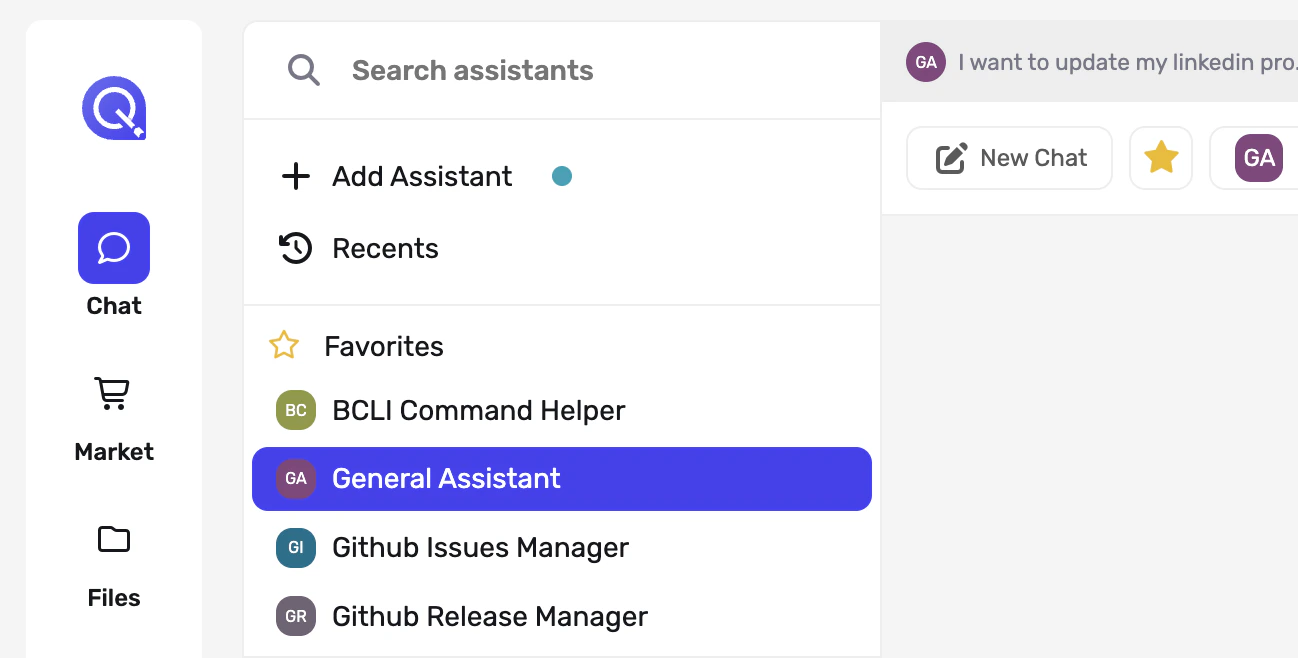
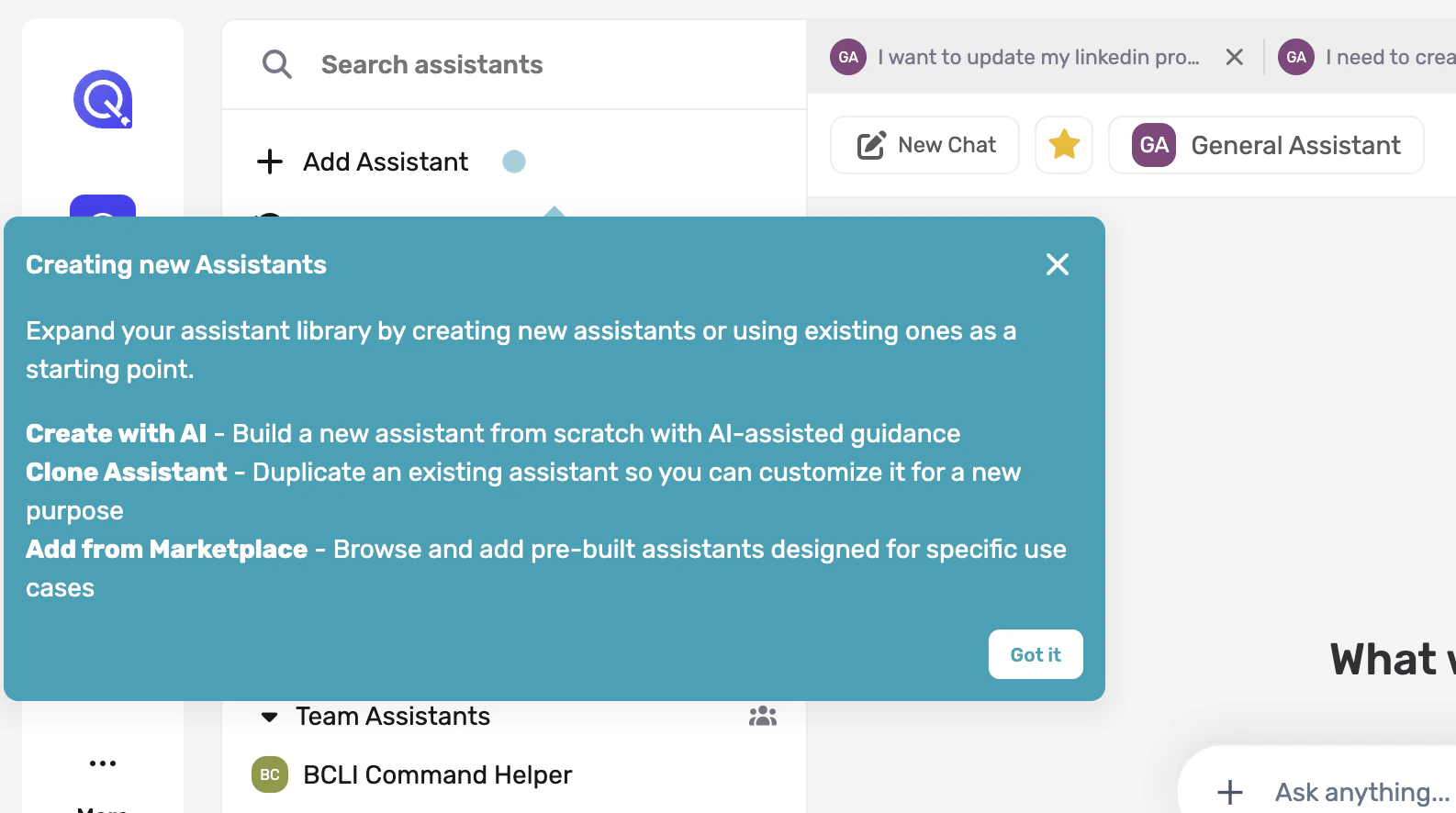
 ### Interactive Onboarding System
New users see animated guide dots highlighting key features with contextual tooltips. The system learns which hotspots you've dismissed and personalizes the experience. Keyboard navigation (Escape to close, Enter to toggle) ensures accessibility.
### Interactive Onboarding System
New users see animated guide dots highlighting key features with contextual tooltips. The system learns which hotspots you've dismissed and personalizes the experience. Keyboard navigation (Escape to close, Enter to toggle) ensures accessibility.
 ### Mobile-Optimized Credit Usage
Track your credit consumption beautifully on any device. Responsive grid layout, sticky table columns, and integrated menu access make credit management effortless on mobile and desktop.
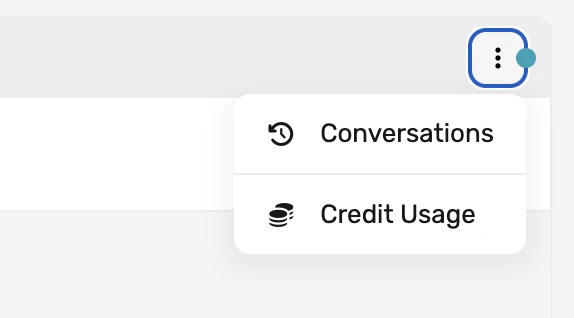
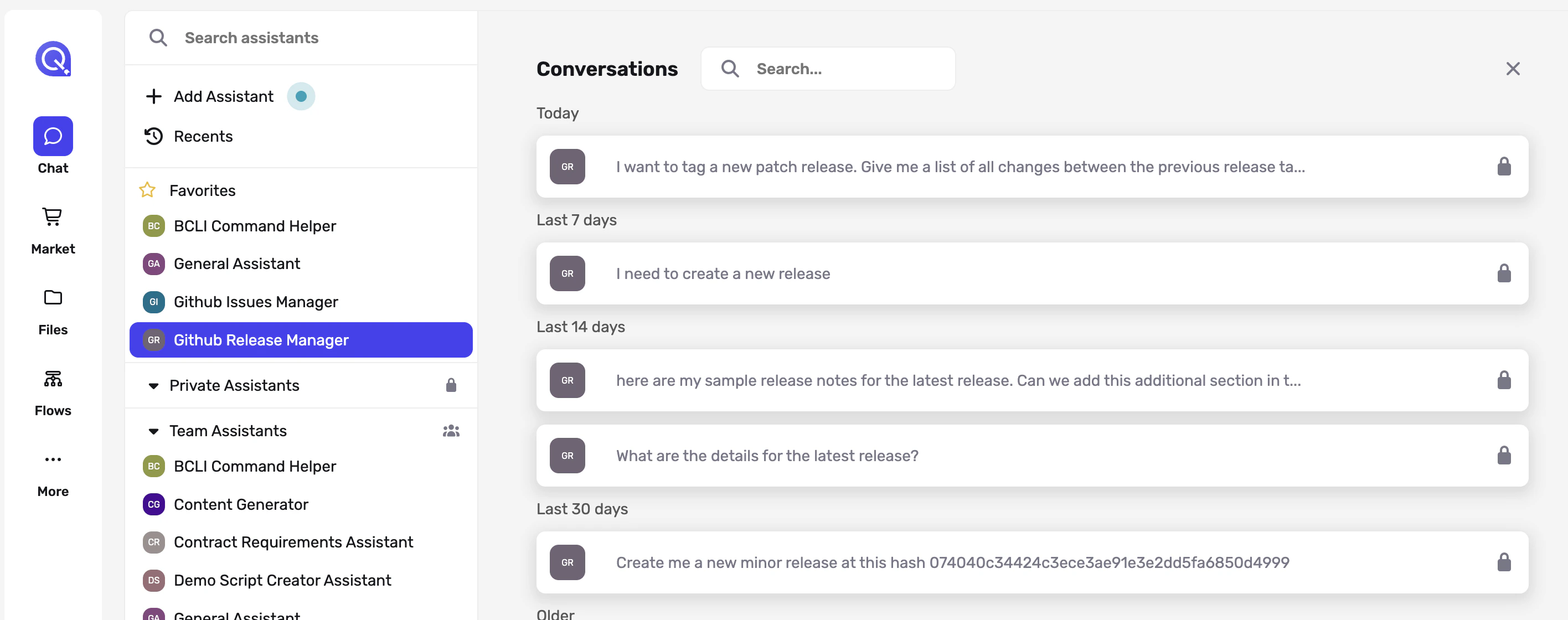
### Improved Session History
Reorganized history interface with search functionality. New header menu consolidates conversations, credit usage, sharing, and favorites. Advanced color system provides better visual hierarchy.
### Mobile-Optimized Credit Usage
Track your credit consumption beautifully on any device. Responsive grid layout, sticky table columns, and integrated menu access make credit management effortless on mobile and desktop.
### Improved Session History
Reorganized history interface with search functionality. New header menu consolidates conversations, credit usage, sharing, and favorites. Advanced color system provides better visual hierarchy.
 ## 🛠️ Bug Fixes & Improvements
Fixed modal close functionality across agent details, ensuring a smooth editing experience.
Fixed agent image display in recent sessions with proper validation and name resolution.
Session redirects after re-login now preserve your original deep links and query parameters.
Enhanced tabs scroll behavior with improved popper positioning for better menu placement.
Added confirmation dialogs when closing edit forms with unsaved changes across all agent detail sections.
Improved knowledge component callbacks, file extension handling, and MIME type mapping for better file management.
Fixed blob URL handling in image previews with proper data URL conversion and document rendering.
Agent ownership and sharing settings are now properly preserved during updates.
Enhanced JWT token handling and improved secret management in data point requests.
## 📞 Support & Feedback
Learn how to use all new v1.1.3 features in our comprehensive docs
Join our community to discuss features and get help from other users
Need help? Reach out to our support team
Have an idea? We'd love to hear your feedback
***
**Release Date:** March 13, 2026\
**Version:** v1.1.2\
**Release Type:** Patch Release
# QuivaWorks v1.1.2 – Enhanced Features & Stability
v1.1.2 delivers powerful new capabilities alongside critical stability improvements. This patch brings file preview functionality, enhanced AI tool reliability, and expanded workflow automation to accelerate your productivity.
This release is fully backward compatible—no breaking changes or migration steps required.
## 🎯 Key Highlights
Preview Word documents, Excel spreadsheets, and PDFs directly in your workflow
Enhanced "Build with AI" and "Improve Instructions" tools with better context sharing
Download associated knowledge bases automatically when importing agents
Invoke agent nodes by subject within flows for dynamic orchestration
Integrated news and web search tool for enhanced agent intelligence
Choose between private and team sharing when creating assistants
## ✨ What's New
### Comprehensive File Preview System
View your files without leaving. Preview Word documents, Excel spreadsheets, and PDFs with full formatting support. Files in your knowledge base and chat messages now include preview functionality for seamless document inspection.
### Helper Context Variables
Improved context sharing in AI tools enables more intelligent, contextually-aware responses from your assistants and agents.
### Builtin Search Tool
New integrated search capability brings news and web search functionality directly into your agent workflows.
### Agent Invocation by Subject
Enhanced flow automation allows you to invoke agent nodes by subject, enabling more dynamic and flexible workflow orchestration.
### Automatic Knowledge Synchronization
When you download an agent from the marketplace, its associated knowledge bases are now automatically included, ensuring your agents are fully functional out of the box.
## 🛠️ Bug Fixes & Improvements
Fixed CSS scrolling behavior on Windows systems for smoother user experience.
Resolved display issues with the instructions autocomplete dropdown.
Enhanced data handling and context variable processing to eliminate spinning issues.
Improved knowledge deletion functionality and display of knowledge names.
Smart language detection and improved text handling for pasted content.
Fixed team and private sharing options during assistant creation.
Enhanced production logging for better operational visibility and debugging.
## 📞 Support & Feedback
Learn how to use all new v1.1.2 features in our comprehensive docs
Join our community to discuss features and get help from other users
Need help? Reach out to our support team
Have an idea? We'd love to hear your feedback
***
# QuivaWorks v1.1.1 Release Notes
**Release Date:** March 9, 2026 **Version:** v1.1.1 **Release Type:** Patch Release
## Overview
We're excited to announce **QuivaWorks v1.1.1**, a comprehensive patch release focused on **cost tracking**, **document processing capabilities**, **marketplace ecosystem expansion**, **team collaboration permissions**, and **user experience improvements**. This release delivers significant enhancements to billing infrastructure, knowledge management, and assistant customization.
This release is fully backward compatible—no breaking changes. All existing integrations, APIs, and workflows continue to function without modification.
***
## 🎯 Key Highlights
### Personal Assistant Context & Team Assistants
Personalize team assistants with your own settings, create personal assistants, and publish them to your team. Customize instructions, knowledge bases, integrations, and output schemas while maintaining shared assistant definitions.
### Comprehensive Cost Tracking System
Track and monitor AI usage costs across your account with real-time visibility into spending and budgets. Receive proactive budget alerts and export usage data for reporting.
### Large Document Processing System
Enhance the knowledge and attachment system with a powerful, scalable document exploration engine optimized for large files and complex reasoning.
### Unified Marketplace Submission System
Streamline publishing of Assistants, Integrations, and Flows to the marketplace with version management, asset handling, and collaborative review workflows.
### Team Collaboration & Enhanced Permissions
Add team members with read-only access for secure collaboration. New Collaborator role enables usage of team assistants without creation or editing capabilities.
***
## 🚀 Major Features
### Personal Assistant Context & Team Assistants
Enable users to personalize team assistants with personal context while maintaining shared assistant definitions, and publish personal assistants to the team.
**What's New:**
* **Personal Assistant Context** — Customize any assistant with your own settings without modifying the shared definition:
* Personal instructions and behavior modifications - these augment the behaviour to include both the team instructions, and your personal instructions
* Knowledge base and context variables specific to your use case - Upload documents to knowledge that are only applicable to you
* Integration configurations tied specifially to your user - add integrations applicable to you and not the broader assistant
* Personal context variable customization - context variables are provided to the assistant when you run it. A good use case of this is setting a username or userID for your user that you want the assistant to know every time you trigger it.
* **Assistant Ownership & Sharing Model**
* **Personal Assistants** — Assistants you create, visible only to you
* **Team Assistants** — Assistants created by team members and shared with the whole team
* **Shared Configurations** — Team assistant definitions remain unchanged; your personal context is separate
* **Publish Personal Assistants** — Convert personal assistants to team assistants for organization-wide access
* **Assistant Discovery & Filtering**
* Separate views for personal vs. team assistants in sidebar
* Advanced assistant search via indexing
* Favorite assistants marking for quick access
***
### Comprehensive Credit Tracking System
Track and monitor AI usage credits across your account with real-time visibility into credit usage and budgets.
**What's New**
* **Credit Events Dashboard** - View detailed cost logs with advanced filtering by session, correlation ID, and date ranges
* **Budget Warning System** - Receive proactive email notifications when credit balance drops below 200, 100, or reaches 0
* **Session-Based Cost Monitoring** - Track costs per chat session and subassistant interactions - click the coin icon in your chat session to view the credit tracking events
* **CSV Export for Admins** - Export cost events and usage data for reporting and analysis
**Impact**
Gain complete visibility into your AI credit usage with proactive alerts that help you manage budgets effectively.
***
### Large Document Processing System
We have upgraded our knowledge systems with a powerful, scalable document exploration engine optimized for large files and complex reasoning.
**What's New**
* Three specialized AI systems for different tasks:
* Fast, lightweight system for quick document searches
* Standard-reasoning system for finding and displaying relevant content with excerpts
* Advanced reasoning system for synthesis, summarization, and cross-document analysis
**Impact**
Process documents in greater detail with specialized systems optimized for different use cases. Deep mode is enabled for comprehensive analysis of all documents you upload for better contextual understanding. This process consumes more credits but provides better results
***
### Unified Marketplace Submission System
Streamline publishing of Assistants, Integrations, and Flows to the marketplace with version management, asset handling, and collaborative review workflows.
**What's New**
* **Multi-Product Publishing** - Submit Assistants, Integrations, and Flows through a unified interface
* **Version Management (Time Machine)** - Restore previous versions of assistants and flows; track draft and published versions separately
* **README Support** - Author comprehensive documentation in Markdown with live preview in submissions
* **Asset Management** - Upload logos, screenshots, and other assets
* **Enhanced Review Workflow** - Status filtering, sortable submissions, sticky review panel, and batch asset downloads
* **New Submission Modal** - Step-based wizard (type selection → item selection → creation) for intuitive publishing
**Impact**
Publish to the marketplace faster with an intuitive wizard interface. Version management lets you maintain multiple versions and rollback when needed.
***
## ✨ Additional Features & Enhancements
Empower users to customize assistant behavior with alternative names and custom configurations. Support assistant and integration marketplace submissions with product-specific indexing and filtering. Automatic cleanup of expired OAuth connections with improved error handling.
Add team members with read-only access for secure collaboration without editing capabilities. Collaborators have full visibility to team assistants, flows, and marketplace but cannot create, edit, or delete items. Perfect for providing access to assistants to your team without giving them the ability to modify how they behave.
Improved payment processing with better Stripe webhook handling, subscription cancellation tracking, and credit-based budget alerts. Professional email notifications help you manage budgets proactively with intelligent thresholds (200, 100, 0 credits remaining).
Optimized research operations with improved LLM provider selection. Better cost-effective reasoning while maintaining identical functionality and strong tool use capabilities.
Connect to Apple iCloud accounts for comprehensive calendar and email management. Full event CRUD operations, recurring event expansion, and email management with HTML support and attachments. Seamless integration without leaving the platform.
Fixed critical assistant management issues including active assistant selection, cloning, and session restoration. New features include favorite assistants with collapsible sidebar sections, assistant appearance customization with avatar and color options, and auto-created chat sessions when selecting an assistant.
Improved platform accessibility with auto-hiding scrollbars, semantic HTML, enhanced dark mode contrast, and better keyboard navigation. Visual feedback includes published mode indicators and cleaner interface design across a number of components.
***
## ✅ What This Means For You
Monitor AI usage in real-time with proactive budget alerts that help you manage credits effectively.
Customize team assistants with your own context while keeping shared definitions intact. Publish personal assistants to your team.
Process large documents with specialized systems optimized for different use cases and reliable performance at scale.
Publish to the marketplace faster with an intuitive wizard and version management for rolling back when needed.
Invite collaborators with read-only access for assistant usage of team assistants without risking accidental modifications.
Connect iCloud services for comprehensive calendar and email management seamlessly integrated into your workflow.
***
## 🚀 Getting Started with v1.1.1
Your instance will be automatically updated to v1.1.1. Here's what you should know:
### For New Users
1. **Explore Usage Tracking** - View the usage page and review your credits by clicking the new icon when in a chat session
2. **Try Document Processing** - Use the enhanced document processing to handle larger documents more efficiently
3. **Publish to Marketplace** - Share your flows and assistants with the community
4. **Invite Collaborators** - Add team members to use and collaborate with assistants without risking modification
### For Existing Users
1. **Review Credit Dashboard** - Understand your current usage patterns and spending
2. **Customize Assistants** - Create personal assistants and use personal context on team assistants
3. **Manage Team Access** - Invite collaborators with the new read-only role
Start by exploring the personal context settings to understand how you can use team assistants with better personal context to provide better results.
***
## 🔄 Backward Compatibility
✅ **Fully Backward Compatible** — No breaking changes. All existing integrations, APIs, and workflows continue to function without modification.
***
## 🔐 Security & Reliability
* ✅ Enhanced OAuth connection lifecycle management
* ✅ Budget accounting resilience with intelligent protection
* ✅ Improved webhook event handling with structured logging
* ✅ Custom header authentication support for integrations
***
## 📞 Support & Feedback
Have questions about v1.1.1? We'd love to hear from you!
Explore our comprehensive documentation for guides and tutorials.
Join our Slack community to discuss features and share best practices.
Need help? Reach out to our support team.
Share your ideas for future QuivaWorks improvements.
***
## 🙏 Thank You
Thank you to everyone using QuivaWorks. Your feedback and usage help us continuously improve the platform.
**Happy building with QuivaWorks! 🎉**
***
## 📚 Learn More
For more details, visit [quiva.ai](https://quiva.ai).
***
*Last updated: March 9, 2026*
***
# QuivaWorks v1.1.0 Release Notes
**Release Date:** February 13, 2026\
**Version:** v1.1.0\
**Release Type:** Minor Release\
**Headline:** Real-Time Chat Streaming, Hierarchical Sessions & Marketplace Redesign
## Overview
We're thrilled to announce **QuivaWorks v1.1.0**, a transformative minor release that brings real-time chat streaming to the forefront of your experience. Assistants now respond in real-time as they think and work, dramatically improving responsiveness and user satisfaction. Beyond streaming, this release introduces intelligent session management, a completely redesigned marketplace, enhanced date/time intelligence, and significant mobile improvements.
This release includes 19 merged pull requests spanning chat streaming, session management, marketplace redesign, mobile optimization, account management, and backend reliability.
Chat streaming is enabled by default! Watch assistant responses appear character-by-character as they're generated. No configuration needed.
***
## 🎯 Key Highlights
### Real-Time Chat Streaming
Assistants now stream responses in real-time. See responses appear character-by-character as assistants think and work through problems, dramatically improving responsiveness and user satisfaction.
### Hierarchical Session Management
Assistants can now offload complex tasks to sub-assistants while maintaining conversation context. Navigate seamlessly between parent and child conversations with automatic summarization.
### Redesigned Marketplace
The marketplace has been completely rebuilt with modern product cards, category-based navigation, dark mode support, and improved discovery for integrations and assistants.
### Enhanced Date & Time Intelligence
Natural language date parsing now understands "tomorrow", "next week", "in 3 days", and more. Includes calendar display, timezone support, and intelligent timestamp conversion.
### Mobile-First Experience
Significantly improved mobile experience with responsive layouts, collapsible sidebars, optimized touch interactions, and iOS-specific fixes.
***
## ⚡ Real-Time Chat Streaming
**See assistant responses as they happen, not after they complete.**
Chat streaming is the headline feature of v1.1.0. Powered by comprehensive backend improvements, assistants now stream their responses in real-time as they think and work through problems. This dramatically improves the user experience.
### What You Get
* **Instant Feedback** - Watch responses appear character-by-character as assistants process information
* **Better Responsiveness** - No more waiting for long-running operations to complete
* **Improved Reliability** - Built-in message validation prevents orphaned API errors
* **Seamless Experience** - Streaming works across all chat interfaces and assistant types (GraphAssistant, LLM Assistant, etc.)
* **Automatic Repair** - Messages are automatically validated and repaired if chat history is truncated
### How It Works
Ensures streamed messages stay synchronized even when chat history is truncated. Orphaned tool\_use/tool\_result pairs are automatically detected and repaired before they reach the user.
Enhanced knowledge extraction with automatic CLI fallback when the Go library fails silently. Documents are now gracefully skipped if extraction fails, preventing cache pollution.
Reordered validation to run AFTER history truncation, catching and repairing issues before they affect users. Comprehensive test coverage ensures reliability.
Chat streaming is enabled by default and requires no configuration. Start using it immediately with any assistant!
***
## 🔄 Hierarchical Session Management
**Navigate conversations with parent-child session linking.**
Assistants can now offload complex tasks to sub-assistants while maintaining conversation context. Users can seamlessly navigate between parent and child conversations.
### Key Features
Link related conversations together for better organization and context preservation.
Child sessions are automatically summarized for quick reference and context switching.
"Back to parent conversation" button for easy navigation between related sessions.
Tool responses can include links to related sessions for full context.
### Use Cases
* **Complex Multi-Step Tasks** - Split work across sub-assistants while keeping context
* **Research Tasks** - Delegate research to specialized assistants and review findings
* **Parallel Processing** - Run multiple sub-tasks simultaneously with conversation tracking
* **Expert Delegation** - Route to specialized assistants while maintaining parent conversation
***
## 📅 Enhanced Date & Time Intelligence
**Smarter temporal understanding with natural language dates.**
The DateTime tool now understands how you naturally think about time, making conversations more natural and reducing user friction.
### New Capabilities
"tomorrow", "yesterday", "next week", "in 3 days", "+5 days", "-2 weeks", "YYYY-MM", "Month Year"
ASCII calendars with ISO 8601 week layout for visual reference and planning.
Automatically detects and converts millisecond timestamps (13+ digits) to readable dates.
Proper handling of leap years, month boundaries, and timezone-aware calculations.
### Impact
Assistants can now understand temporal references without explicit formatting, making conversations more natural and improving task completion rates.
***
## 🎨 Completely Redesigned Marketplace
**Browse, discover, and manage integrations with a modern interface.**
The marketplace has been completely redesigned from the ground up with a focus on usability, visual appeal, and discoverability.
### What's New
* **Modern Product Cards** - Clean, scannable product listings with rich metadata and visual hierarchy
* **Sidebar Navigation** - Category-based browsing with collapsible sections for easier discovery
* **Dark Mode Support** - Full dark mode styling throughout the marketplace
* **Responsive Design** - Optimized for desktop, tablet, and mobile devices
* **Product Overview** - Detailed product information with sidebar controls and rich descriptions
* **Improved Search** - Better filtering and categorization for quick discovery
* **Visual Improvements** - Updated shadows, borders, and spacing for modern aesthetic
### Components
Clean, scannable cards with product image, name, description, and quick actions. Hover effects and visual feedback for better interactivity.
Collapsible sidebar with category-based navigation. Swappable menu items and responsive behavior for mobile.
Detailed product view with sidebar controls, rich descriptions, and action buttons. Grid layout for desktop, responsive flexbox for mobile.
Full dark mode support with proper contrast, border colors, and background styling throughout the marketplace.
***
## 📱 Mobile Experience Improvements
**Optimized interface for mobile and tablet users.**
Significant improvements across the entire platform for a native mobile experience.
### Mobile Enhancements
Fixed chat focus behavior on mobile. Separate height limits for mobile (135px) vs desktop (400px) inputs.
Dynamic sidebar that collapses on smaller screens. Intelligent breakpoint at 625px height for compact mode.
Improved form layouts and input handling for touch interfaces. Better spacing and larger touch targets.
Better button sizing and spacing for touch interfaces. Icon-only headers on mobile for space efficiency.
### Technical Improvements
* Portable device detection to prevent unwanted chat focus
* Dynamic layout calculations based on viewport size
* Horizontal scrolling for assistant details tabs on mobile
* Optimized thumbnail sizing with responsive properties
* Fixed iOS viewport and keyboard handling
***
## 👤 Enhanced Account & Billing Management
**Better control over subscriptions, seats, and team management.**
Account management has been significantly enhanced with new features for managing subscriptions and team members.
### New Features
Track occupied seats and manage user assignments. Validate seat availability before unsuspending users.
Schedule downgrades with advance notice. Support for subscription schedule cancellation with clear notifications.
Search users by multiple conditions. Last login tracking to see when team members last accessed the platform.
Better formatted notification emails with multi-recipient support. Cleaner HTML structure for better compatibility.
### Account Operations
* Parallel processing for faster user list operations
* Enhanced webhook logging for billing events
* New billing event types: `DowngradeScheduled`, `DowngradeUnscheduled`, `DowngradeFailed`
* Admin notifications for billing issues
* Pending downgrade tracking in account information
***
## 🔧 Technical Improvements & Backend Reliability
**Faster, more reliable infrastructure.**
Under the hood, we've made significant improvements to backend performance and reliability.
### Performance & Stability
Prevents orphaned tool\_use/tool\_result pairs in streamed conversations. Automatic repair when chat history is truncated.
Graceful fallback for PDF text extraction failures. CLI fallback when Go library fails silently. Skip empty content to prevent cache pollution.
Improved document processing with better error handling. Optimized content caching to prevent invalid entries.
Optimized default storage directory structure. Improved indexing for better retrieval performance.
Fixed 26+ test failures across the entire test suite. Comprehensive regression testing for all subsystems.
## ✅ Backward Compatibility
✅ **Fully Backward Compatible** - No breaking changes in v1.1.0
All existing assistants, integrations, and configurations continue to work without modification. This is a pure feature addition release with no deprecated functionality.
***
## 🚀 Getting Started with v1.1.0
Your instance will be automatically updated to v1.1.0. Here's what you should know:
### For New Users
1. **Explore Chat Streaming** - Try any assistant and watch responses stream in real-time
2. **Browse Marketplace** - Discover new integrations and assistants in the redesigned marketplace
3. **Configure Integrations** - Use improved OAuth tools for third-party connections
4. **Multi-Session Workflow** - Open multiple tabs to work on different tasks simultaneously
### For Existing Users
1. **Experience Chat Streaming** - Existing assistants now stream responses automatically
2. **Try Hierarchical Sessions** - Use sub-assistants for complex tasks with parent-child linking
3. **Explore Marketplace** - Check out the redesigned marketplace with new features
4. **Mobile Improvements** - Test the optimized mobile experience on your device
### For Developers
1. **Review API Changes** - Check out the new `assistant.api.ts` structure
2. **Update Components** - Use `AltButton` for consistent button styling
3. **Test Streaming** - Verify streaming responses work with your custom assistants
4. **Review Message Validation** - Understand new validation for custom implementations
### For Enterprise
1. **Review Account Management** - New seat tracking and subscription scheduling
2. **Configure Billing** - Set up downgrade schedules and notifications
3. **Monitor Performance** - Use new Prometheus configuration for better insights
4. **Plan Migrations** - No migration needed; v1.1.0 is fully backward compatible
***
## 💬 Feedback & Support
Have questions about v1.1.0? We'd love to hear from you!
Reach out to our support team for help and questions.
Found an issue? Report it on GitHub.
Share your ideas for future QuivaWorks improvements.
Join our community to discuss features and share best practices.
***
## 🙏 Thank You
Thank you to everyone who contributed to QuivaWorks v1.1.0
Your feedback and contributions help us continuously improve the platform.
**Happy building with QuivaWorks! 🎉**
***
*Last updated: February 13, 2026*
***
# QuivaWorks v1.0.5 Release Notes
**Release Date:** February 6, 2026\
**Version:** v1.0.5\
**Release Type:** Patch Release
## Overview
We're excited to announce **QuivaWorks v1.0.5**, a focused patch release that enhances your Assistant experience with improved session persistence, expanded marketplace capabilities, better mobile support, and more reliable integrations. This release includes 40+ improvements spanning Assistant sessions, marketplace assistants, mobile optimization, and integration management.
Support has been removed for OpenAI and Gemini models due to performance. Upgrading configuration is required for existing assistants using these models.
***
## 🎯 Key Highlights
### Assistant Session Persistence
Your Assistant conversations are now automatically saved and can be restored anytime. Resume conversations across devices, manage multiple chat tabs simultaneously, and never lose your work.
### Expanded Marketplace
New project management and research assistants join the marketplace, including GitHub Release Manager, Issues Manager, Incident Report Manager, and Company News Tracker.
### Mobile-First Enhancements
Significantly improved mobile experience with collapsible sidebars, responsive layouts, better touch interactions, and iOS-specific fixes for a seamless experience on any device.
### Reliable Integrations
OAuth connection management has been overhauled with the ability to edit redirect URLs, reliably delete integrations, and better authentication handling across all connection types.
***
## ✨ What's New
### Assistant Sessions
* **Resume Conversations** - Close the app and continue exactly where you left off
* **Multiple Chat Tabs** - Keep multiple conversations with the same Assistant open simultaneously
* **Recent Sessions** - Quick access to recently used chats without scrolling
* **Automatic Prompt Saving** - Never lose what you're typing
* **Cross-Device Sync** - Sessions sync to the backend for access from any device
### Marketplace Assistants
* **GitHub Release Manager** - Automate releases with semantic versioning and commit analysis
* **GitHub Issues Manager** - Streamline issue tracking and workflow management
* **Incident Report Manager** - Document and track incidents with structured workflows
* **Company News Tracker** - Research companies with automated news aggregation
* **Improved Downloads** - Assistants are ready to use immediately after download
### Mobile Experience
* **Collapsible Sidebar** - Intelligent sidebar collapse on mobile for more screen space
* **Improved Touch Interaction** - Fixed iOS font sizing and keyboard behavior
* **Responsive Tab Management** - Chat tabs display as dropdown menu on mobile
* **Better Tool Output Display** - Collapsible large outputs keep conversations clean
* **Optimized Prompt Input** - Message input area expands properly on all devices
* **Cleaner Navigation** - Clear labels and "New Chat" button for quick access
* **Dynamic Viewport Handling** - Fixed iOS viewport and keyboard issues
* **Icon-Only Headers** - Maximized space with visual cues on mobile
### Vision Tool
* **Content Type Validation** - Intelligent validation ensures you use the right tool
* **Better Error Messages** - Helpful suggestions when analyzing unsupported formats
* **Memory Optimization** - Fixed vision cache memory leak
### Integration Management
* **Edit Redirect URLs** - Modify OAuth redirect URLs for flexible configuration
* **Delete Integrations Reliably** - Fixed critical bugs preventing connection deletion
* **Delete Confirmation Warning** - Warns when removing connections used by multiple Assistants
* **Visible Auth URLs** - Authentication URLs displayed in account settings
* **Cleaner Connection Cards** - Active indicators and icon-based controls
* **Flexible Authentication Types** - Support for API Key, Basic Auth, Bearer Token, OAuth
* **Better Error Handling** - Improved stability in connection management
* **Personal vs. Shared Connections** - Clear distinction between connection types
***
## ⚠️ Breaking Changes
### Streamlined LLM Provider Support
We've focused our platform on Claude models for optimal performance and reliability:
* **OpenAI and Gemini models have been removed**
* **Action Required:** Reconfigure assistants using OpenAI or Gemini to use Claude models
* **Recommended:** Claude 3.5 Sonnet for best performance
* **Why:** Enables platform optimization for Claude's capabilities with better performance, reliability, and cost efficiency
### Deprecated Gemini Embeddings
* **Gemini embeddings have been removed**
* **Action Required:** Migrate to Claude embeddings or other configured providers before upgrading
* **Impact:** Affects knowledge base embedding configurations only
***
## 🛠️ Technical Improvements
Fixed accuracy of credit usage reporting to ensure billing reflects actual usage with improved validation.
Resolved conflicts with knowledge file naming and improved cross-account search functionality for better retrieval performance.
Enhanced validation of API keys, fixed secret key creation issues, and improved authentication configuration handling.
Fixed indexing issues affecting knowledge retrieval and resolved assistant download bugs for improved platform reliability.
***
## ✅ What This Means For You
Never lose your work. Resume conversations anytime, anywhere, across all your devices.
Native mobile experience with responsive design and iOS-specific optimizations.
Manage OAuth connections with confidence using improved authentication tools.
New marketplace assistants for project management and research workflows.
***
## 🚀 Getting Started with v1.0.5
Your instance will be automatically updated to v1.0.5. Here's what you should know:
### For Existing Users
1. **Update Assistant Models** - If using OpenAI or Gemini, reconfigure to Claude models
2. **Explore New Features** - Try session persistence and mobile improvements
3. **Review Integrations** - Check OAuth connections with new management tools
4. **Migrate Embeddings** - If using Gemini embeddings, migrate to supported providers
### For New Users
1. **Browse Marketplace** - Deploy new project management and research assistants
2. **Mobile Experience** - Enjoy optimized mobile interface on any device
3. **Configure Integrations** - Use improved OAuth tools for third-party connections
4. **Multi-Session Workflow** - Open multiple tabs to work on different tasks simultaneously
Visit the marketplace to explore the new GitHub and incident management assistants. These tools can significantly streamline your workflow automation.
***
## 🔄 Backward Compatibility
✅ **Backward Compatible** (with model migration)
* All existing Assistants continue to work after model reconfiguration
* No API changes required
* Previous configurations remain valid (except deprecated models)
* Full support for existing integrations
***
## 📞 Support & Feedback
Have questions about v1.0.5? We'd love to hear from you!
Explore our comprehensive documentation for guides and tutorials.
Join our community to discuss features and share best practices.
Need help? Reach out to our support team.
Share your ideas for future QuivaWorks improvements.
***
## 🙏 Thank You
Thank you to everyone who contributed to QuivaWorks v1.0.5. Your feedback and contributions help us continuously improve the platform.
**Happy building with QuivaWorks! 🎉**
***
*Last updated: February 6, 2026*
# QuivaWorks v1.0.4 Release Notes
**Release Date:** January 27, 2026\
**Version:** v1.0.4\
**Release Type:** Patch Release
## Overview
We're excited to announce **QuivaWorks v1.0.4**, a focused patch release designed to enhance your experience across the platform. This release includes 35+ improvements spanning knowledge management, Assistant capabilities, navigation, and marketplace features.
All improvements in this release maintain full backward compatibility with previous versions. No migration or configuration changes required.
***
## 🎯 Key Highlights
### Enhanced Knowledge Management
Improved knowledge upload and management workflows make it easier to organize and utilize your documentation. Better integration with Mintlify documentation systems ensures seamless content handling.
### Smarter Assistant Features
Experience improved Assistant interfaces with enhanced capabilities, better model selection tools, and improved Assistant-to-Assistant communication for more sophisticated automations.
### Redesigned Navigation
New sidebar navigation system provides a cleaner, more intuitive way to explore QuivaWorks. Navigate faster and find what you need with our improved UX.
### Marketplace Expansion
Deploy marketplace Assistants directly to your new accounts with improved integration between the marketplace and your core platform.
### Credits
## Credits are now included with every plan to allow you to use QuivaWorks as soon as you create an account without the need to get your own API keys.
## ✨ What's New
### Knowledge Management
* **Streamlined Knowledge Upload** - Upload and manage documentation with improved workflows
* **Enhanced Knowledge UI** - Better interface for organizing and retrieving your knowledge base
### Assistant Improvements
* **Enhanced Assistant Interface** - Redesigned Assistant tabs for better visibility and control
* **Streaming Capabilities** - Real-time streaming support for Assistant communication
* **Flexible Model Selection** - Improved tools for choosing and configuring Assistant models
* **Assistant Resources** - New tools for creating and managing Assistant resources
* **Better Communication** - Enhanced protocols for Assistant-to-Assistant interactions
### Navigation & Interface
* **Sidebar Navigation** - Complete redesign of the sidebar for improved navigation
* **Better Routing** - Faster, more intuitive page transitions
* **Refined User Experience** - UX improvements throughout the platform
### Marketplace & Deployment
* **Account Deployment** - Deploy marketplace Assistants to new accounts with a single click
* **Improved Integration** - Better connection between marketplace and platform features
### Performance & Stability
* **Chat Optimization** - Performance improvements to the chat interface
* **Tool Mapping** - Refined tool response mapping system
* **Reliability Enhancements** - Various stability improvements across the platform
***
## 🛠️ Technical Improvements
Improved session handling and cleanup procedures ensure optimal platform performance and resource utilization.
Better tracking of account limits, plan assignments, and usage analytics provides clearer visibility into your account status.
Fixed circular reference issues in OpenAPI schema handling for more reliable integrations.
Enhanced error handling in critical paths ensures a more stable and predictable experience.
***
## ✅ What This Means For You
This patch release requires no migration or system changes. Your setup continues to work seamlessly.
Chat optimizations and stability improvements make QuivaWorks faster and more responsive.
Redesigned navigation and improved interfaces make the platform easier and more intuitive to use.
New Assistant features and marketplace capabilities expand what you can build and automate.
***
## 🚀 Getting Started with v1.0.4
No action required! Your instance will be automatically updated to v1.0.4. Here's what you should know:
### For Existing Users
1. **No Changes Needed** - Your current configurations and data remain intact
2. **New Features Available** - Start using improved Assistants and knowledge management immediately
3. **Better Experience** - Enjoy the improved navigation and UI enhancements
### For New Users
1. **Deploy Assistants** - Use the improved marketplace to deploy Assistants to your accounts
2. **Manage Knowledge** - Leverage enhanced knowledge management for better documentation handling
3. **Configure Assistants** - Enjoy improved model selection and Assistant resource management
Explore the new sidebar navigation to discover all available features. The improved interface makes it easier to find and use QuivaWorks capabilities.
***
## 🔄 Backward Compatibility
✅ **100% Backward Compatible**
* All existing Assistants continue to work without modification
* No API changes required
* Previous configurations remain valid
* Full support for existing integrations
***
## 📞 Support & Feedback
Have questions about v1.0.4? We'd love to hear from you!
Explore our comprehensive documentation for guides and tutorials.
Join our community to discuss features and share best practices.
Need help? Reach out to our support team.
Share your ideas for future QuivaWorks improvements.
***
## 🙏 Thank You
Thank you to everyone who contributed to QuivaWorks v1.0.4. Your feedback and contributions help us continuously improve the platform.
**Happy building with QuivaWorks! 🎉**
--------------------------------------
*Last updated: January 27, 2026*
## 🛠️ Bug Fixes & Improvements
Fixed modal close functionality across agent details, ensuring a smooth editing experience.
Fixed agent image display in recent sessions with proper validation and name resolution.
Session redirects after re-login now preserve your original deep links and query parameters.
Enhanced tabs scroll behavior with improved popper positioning for better menu placement.
Added confirmation dialogs when closing edit forms with unsaved changes across all agent detail sections.
Improved knowledge component callbacks, file extension handling, and MIME type mapping for better file management.
Fixed blob URL handling in image previews with proper data URL conversion and document rendering.
Agent ownership and sharing settings are now properly preserved during updates.
Enhanced JWT token handling and improved secret management in data point requests.
## 📞 Support & Feedback
Learn how to use all new v1.1.3 features in our comprehensive docs
Join our community to discuss features and get help from other users
Need help? Reach out to our support team
Have an idea? We'd love to hear your feedback
***
**Release Date:** March 13, 2026\
**Version:** v1.1.2\
**Release Type:** Patch Release
# QuivaWorks v1.1.2 – Enhanced Features & Stability
v1.1.2 delivers powerful new capabilities alongside critical stability improvements. This patch brings file preview functionality, enhanced AI tool reliability, and expanded workflow automation to accelerate your productivity.
This release is fully backward compatible—no breaking changes or migration steps required.
## 🎯 Key Highlights
Preview Word documents, Excel spreadsheets, and PDFs directly in your workflow
Enhanced "Build with AI" and "Improve Instructions" tools with better context sharing
Download associated knowledge bases automatically when importing agents
Invoke agent nodes by subject within flows for dynamic orchestration
Integrated news and web search tool for enhanced agent intelligence
Choose between private and team sharing when creating assistants
## ✨ What's New
### Comprehensive File Preview System
View your files without leaving. Preview Word documents, Excel spreadsheets, and PDFs with full formatting support. Files in your knowledge base and chat messages now include preview functionality for seamless document inspection.
### Helper Context Variables
Improved context sharing in AI tools enables more intelligent, contextually-aware responses from your assistants and agents.
### Builtin Search Tool
New integrated search capability brings news and web search functionality directly into your agent workflows.
### Agent Invocation by Subject
Enhanced flow automation allows you to invoke agent nodes by subject, enabling more dynamic and flexible workflow orchestration.
### Automatic Knowledge Synchronization
When you download an agent from the marketplace, its associated knowledge bases are now automatically included, ensuring your agents are fully functional out of the box.
## 🛠️ Bug Fixes & Improvements
Fixed CSS scrolling behavior on Windows systems for smoother user experience.
Resolved display issues with the instructions autocomplete dropdown.
Enhanced data handling and context variable processing to eliminate spinning issues.
Improved knowledge deletion functionality and display of knowledge names.
Smart language detection and improved text handling for pasted content.
Fixed team and private sharing options during assistant creation.
Enhanced production logging for better operational visibility and debugging.
## 📞 Support & Feedback
Learn how to use all new v1.1.2 features in our comprehensive docs
Join our community to discuss features and get help from other users
Need help? Reach out to our support team
Have an idea? We'd love to hear your feedback
***
# QuivaWorks v1.1.1 Release Notes
**Release Date:** March 9, 2026 **Version:** v1.1.1 **Release Type:** Patch Release
## Overview
We're excited to announce **QuivaWorks v1.1.1**, a comprehensive patch release focused on **cost tracking**, **document processing capabilities**, **marketplace ecosystem expansion**, **team collaboration permissions**, and **user experience improvements**. This release delivers significant enhancements to billing infrastructure, knowledge management, and assistant customization.
This release is fully backward compatible—no breaking changes. All existing integrations, APIs, and workflows continue to function without modification.
***
## 🎯 Key Highlights
### Personal Assistant Context & Team Assistants
Personalize team assistants with your own settings, create personal assistants, and publish them to your team. Customize instructions, knowledge bases, integrations, and output schemas while maintaining shared assistant definitions.
### Comprehensive Cost Tracking System
Track and monitor AI usage costs across your account with real-time visibility into spending and budgets. Receive proactive budget alerts and export usage data for reporting.
### Large Document Processing System
Enhance the knowledge and attachment system with a powerful, scalable document exploration engine optimized for large files and complex reasoning.
### Unified Marketplace Submission System
Streamline publishing of Assistants, Integrations, and Flows to the marketplace with version management, asset handling, and collaborative review workflows.
### Team Collaboration & Enhanced Permissions
Add team members with read-only access for secure collaboration. New Collaborator role enables usage of team assistants without creation or editing capabilities.
***
## 🚀 Major Features
### Personal Assistant Context & Team Assistants
Enable users to personalize team assistants with personal context while maintaining shared assistant definitions, and publish personal assistants to the team.
**What's New:**
* **Personal Assistant Context** — Customize any assistant with your own settings without modifying the shared definition:
* Personal instructions and behavior modifications - these augment the behaviour to include both the team instructions, and your personal instructions
* Knowledge base and context variables specific to your use case - Upload documents to knowledge that are only applicable to you
* Integration configurations tied specifially to your user - add integrations applicable to you and not the broader assistant
* Personal context variable customization - context variables are provided to the assistant when you run it. A good use case of this is setting a username or userID for your user that you want the assistant to know every time you trigger it.
* **Assistant Ownership & Sharing Model**
* **Personal Assistants** — Assistants you create, visible only to you
* **Team Assistants** — Assistants created by team members and shared with the whole team
* **Shared Configurations** — Team assistant definitions remain unchanged; your personal context is separate
* **Publish Personal Assistants** — Convert personal assistants to team assistants for organization-wide access
* **Assistant Discovery & Filtering**
* Separate views for personal vs. team assistants in sidebar
* Advanced assistant search via indexing
* Favorite assistants marking for quick access
***
### Comprehensive Credit Tracking System
Track and monitor AI usage credits across your account with real-time visibility into credit usage and budgets.
**What's New**
* **Credit Events Dashboard** - View detailed cost logs with advanced filtering by session, correlation ID, and date ranges
* **Budget Warning System** - Receive proactive email notifications when credit balance drops below 200, 100, or reaches 0
* **Session-Based Cost Monitoring** - Track costs per chat session and subassistant interactions - click the coin icon in your chat session to view the credit tracking events
* **CSV Export for Admins** - Export cost events and usage data for reporting and analysis
**Impact**
Gain complete visibility into your AI credit usage with proactive alerts that help you manage budgets effectively.
***
### Large Document Processing System
We have upgraded our knowledge systems with a powerful, scalable document exploration engine optimized for large files and complex reasoning.
**What's New**
* Three specialized AI systems for different tasks:
* Fast, lightweight system for quick document searches
* Standard-reasoning system for finding and displaying relevant content with excerpts
* Advanced reasoning system for synthesis, summarization, and cross-document analysis
**Impact**
Process documents in greater detail with specialized systems optimized for different use cases. Deep mode is enabled for comprehensive analysis of all documents you upload for better contextual understanding. This process consumes more credits but provides better results
***
### Unified Marketplace Submission System
Streamline publishing of Assistants, Integrations, and Flows to the marketplace with version management, asset handling, and collaborative review workflows.
**What's New**
* **Multi-Product Publishing** - Submit Assistants, Integrations, and Flows through a unified interface
* **Version Management (Time Machine)** - Restore previous versions of assistants and flows; track draft and published versions separately
* **README Support** - Author comprehensive documentation in Markdown with live preview in submissions
* **Asset Management** - Upload logos, screenshots, and other assets
* **Enhanced Review Workflow** - Status filtering, sortable submissions, sticky review panel, and batch asset downloads
* **New Submission Modal** - Step-based wizard (type selection → item selection → creation) for intuitive publishing
**Impact**
Publish to the marketplace faster with an intuitive wizard interface. Version management lets you maintain multiple versions and rollback when needed.
***
## ✨ Additional Features & Enhancements
Empower users to customize assistant behavior with alternative names and custom configurations. Support assistant and integration marketplace submissions with product-specific indexing and filtering. Automatic cleanup of expired OAuth connections with improved error handling.
Add team members with read-only access for secure collaboration without editing capabilities. Collaborators have full visibility to team assistants, flows, and marketplace but cannot create, edit, or delete items. Perfect for providing access to assistants to your team without giving them the ability to modify how they behave.
Improved payment processing with better Stripe webhook handling, subscription cancellation tracking, and credit-based budget alerts. Professional email notifications help you manage budgets proactively with intelligent thresholds (200, 100, 0 credits remaining).
Optimized research operations with improved LLM provider selection. Better cost-effective reasoning while maintaining identical functionality and strong tool use capabilities.
Connect to Apple iCloud accounts for comprehensive calendar and email management. Full event CRUD operations, recurring event expansion, and email management with HTML support and attachments. Seamless integration without leaving the platform.
Fixed critical assistant management issues including active assistant selection, cloning, and session restoration. New features include favorite assistants with collapsible sidebar sections, assistant appearance customization with avatar and color options, and auto-created chat sessions when selecting an assistant.
Improved platform accessibility with auto-hiding scrollbars, semantic HTML, enhanced dark mode contrast, and better keyboard navigation. Visual feedback includes published mode indicators and cleaner interface design across a number of components.
***
## ✅ What This Means For You
Monitor AI usage in real-time with proactive budget alerts that help you manage credits effectively.
Customize team assistants with your own context while keeping shared definitions intact. Publish personal assistants to your team.
Process large documents with specialized systems optimized for different use cases and reliable performance at scale.
Publish to the marketplace faster with an intuitive wizard and version management for rolling back when needed.
Invite collaborators with read-only access for assistant usage of team assistants without risking accidental modifications.
Connect iCloud services for comprehensive calendar and email management seamlessly integrated into your workflow.
***
## 🚀 Getting Started with v1.1.1
Your instance will be automatically updated to v1.1.1. Here's what you should know:
### For New Users
1. **Explore Usage Tracking** - View the usage page and review your credits by clicking the new icon when in a chat session
2. **Try Document Processing** - Use the enhanced document processing to handle larger documents more efficiently
3. **Publish to Marketplace** - Share your flows and assistants with the community
4. **Invite Collaborators** - Add team members to use and collaborate with assistants without risking modification
### For Existing Users
1. **Review Credit Dashboard** - Understand your current usage patterns and spending
2. **Customize Assistants** - Create personal assistants and use personal context on team assistants
3. **Manage Team Access** - Invite collaborators with the new read-only role
Start by exploring the personal context settings to understand how you can use team assistants with better personal context to provide better results.
***
## 🔄 Backward Compatibility
✅ **Fully Backward Compatible** — No breaking changes. All existing integrations, APIs, and workflows continue to function without modification.
***
## 🔐 Security & Reliability
* ✅ Enhanced OAuth connection lifecycle management
* ✅ Budget accounting resilience with intelligent protection
* ✅ Improved webhook event handling with structured logging
* ✅ Custom header authentication support for integrations
***
## 📞 Support & Feedback
Have questions about v1.1.1? We'd love to hear from you!
Explore our comprehensive documentation for guides and tutorials.
Join our Slack community to discuss features and share best practices.
Need help? Reach out to our support team.
Share your ideas for future QuivaWorks improvements.
***
## 🙏 Thank You
Thank you to everyone using QuivaWorks. Your feedback and usage help us continuously improve the platform.
**Happy building with QuivaWorks! 🎉**
***
## 📚 Learn More
For more details, visit [quiva.ai](https://quiva.ai).
***
*Last updated: March 9, 2026*
***
# QuivaWorks v1.1.0 Release Notes
**Release Date:** February 13, 2026\
**Version:** v1.1.0\
**Release Type:** Minor Release\
**Headline:** Real-Time Chat Streaming, Hierarchical Sessions & Marketplace Redesign
## Overview
We're thrilled to announce **QuivaWorks v1.1.0**, a transformative minor release that brings real-time chat streaming to the forefront of your experience. Assistants now respond in real-time as they think and work, dramatically improving responsiveness and user satisfaction. Beyond streaming, this release introduces intelligent session management, a completely redesigned marketplace, enhanced date/time intelligence, and significant mobile improvements.
This release includes 19 merged pull requests spanning chat streaming, session management, marketplace redesign, mobile optimization, account management, and backend reliability.
Chat streaming is enabled by default! Watch assistant responses appear character-by-character as they're generated. No configuration needed.
***
## 🎯 Key Highlights
### Real-Time Chat Streaming
Assistants now stream responses in real-time. See responses appear character-by-character as assistants think and work through problems, dramatically improving responsiveness and user satisfaction.
### Hierarchical Session Management
Assistants can now offload complex tasks to sub-assistants while maintaining conversation context. Navigate seamlessly between parent and child conversations with automatic summarization.
### Redesigned Marketplace
The marketplace has been completely rebuilt with modern product cards, category-based navigation, dark mode support, and improved discovery for integrations and assistants.
### Enhanced Date & Time Intelligence
Natural language date parsing now understands "tomorrow", "next week", "in 3 days", and more. Includes calendar display, timezone support, and intelligent timestamp conversion.
### Mobile-First Experience
Significantly improved mobile experience with responsive layouts, collapsible sidebars, optimized touch interactions, and iOS-specific fixes.
***
## ⚡ Real-Time Chat Streaming
**See assistant responses as they happen, not after they complete.**
Chat streaming is the headline feature of v1.1.0. Powered by comprehensive backend improvements, assistants now stream their responses in real-time as they think and work through problems. This dramatically improves the user experience.
### What You Get
* **Instant Feedback** - Watch responses appear character-by-character as assistants process information
* **Better Responsiveness** - No more waiting for long-running operations to complete
* **Improved Reliability** - Built-in message validation prevents orphaned API errors
* **Seamless Experience** - Streaming works across all chat interfaces and assistant types (GraphAssistant, LLM Assistant, etc.)
* **Automatic Repair** - Messages are automatically validated and repaired if chat history is truncated
### How It Works
Ensures streamed messages stay synchronized even when chat history is truncated. Orphaned tool\_use/tool\_result pairs are automatically detected and repaired before they reach the user.
Enhanced knowledge extraction with automatic CLI fallback when the Go library fails silently. Documents are now gracefully skipped if extraction fails, preventing cache pollution.
Reordered validation to run AFTER history truncation, catching and repairing issues before they affect users. Comprehensive test coverage ensures reliability.
Chat streaming is enabled by default and requires no configuration. Start using it immediately with any assistant!
***
## 🔄 Hierarchical Session Management
**Navigate conversations with parent-child session linking.**
Assistants can now offload complex tasks to sub-assistants while maintaining conversation context. Users can seamlessly navigate between parent and child conversations.
### Key Features
Link related conversations together for better organization and context preservation.
Child sessions are automatically summarized for quick reference and context switching.
"Back to parent conversation" button for easy navigation between related sessions.
Tool responses can include links to related sessions for full context.
### Use Cases
* **Complex Multi-Step Tasks** - Split work across sub-assistants while keeping context
* **Research Tasks** - Delegate research to specialized assistants and review findings
* **Parallel Processing** - Run multiple sub-tasks simultaneously with conversation tracking
* **Expert Delegation** - Route to specialized assistants while maintaining parent conversation
***
## 📅 Enhanced Date & Time Intelligence
**Smarter temporal understanding with natural language dates.**
The DateTime tool now understands how you naturally think about time, making conversations more natural and reducing user friction.
### New Capabilities
"tomorrow", "yesterday", "next week", "in 3 days", "+5 days", "-2 weeks", "YYYY-MM", "Month Year"
ASCII calendars with ISO 8601 week layout for visual reference and planning.
Automatically detects and converts millisecond timestamps (13+ digits) to readable dates.
Proper handling of leap years, month boundaries, and timezone-aware calculations.
### Impact
Assistants can now understand temporal references without explicit formatting, making conversations more natural and improving task completion rates.
***
## 🎨 Completely Redesigned Marketplace
**Browse, discover, and manage integrations with a modern interface.**
The marketplace has been completely redesigned from the ground up with a focus on usability, visual appeal, and discoverability.
### What's New
* **Modern Product Cards** - Clean, scannable product listings with rich metadata and visual hierarchy
* **Sidebar Navigation** - Category-based browsing with collapsible sections for easier discovery
* **Dark Mode Support** - Full dark mode styling throughout the marketplace
* **Responsive Design** - Optimized for desktop, tablet, and mobile devices
* **Product Overview** - Detailed product information with sidebar controls and rich descriptions
* **Improved Search** - Better filtering and categorization for quick discovery
* **Visual Improvements** - Updated shadows, borders, and spacing for modern aesthetic
### Components
Clean, scannable cards with product image, name, description, and quick actions. Hover effects and visual feedback for better interactivity.
Collapsible sidebar with category-based navigation. Swappable menu items and responsive behavior for mobile.
Detailed product view with sidebar controls, rich descriptions, and action buttons. Grid layout for desktop, responsive flexbox for mobile.
Full dark mode support with proper contrast, border colors, and background styling throughout the marketplace.
***
## 📱 Mobile Experience Improvements
**Optimized interface for mobile and tablet users.**
Significant improvements across the entire platform for a native mobile experience.
### Mobile Enhancements
Fixed chat focus behavior on mobile. Separate height limits for mobile (135px) vs desktop (400px) inputs.
Dynamic sidebar that collapses on smaller screens. Intelligent breakpoint at 625px height for compact mode.
Improved form layouts and input handling for touch interfaces. Better spacing and larger touch targets.
Better button sizing and spacing for touch interfaces. Icon-only headers on mobile for space efficiency.
### Technical Improvements
* Portable device detection to prevent unwanted chat focus
* Dynamic layout calculations based on viewport size
* Horizontal scrolling for assistant details tabs on mobile
* Optimized thumbnail sizing with responsive properties
* Fixed iOS viewport and keyboard handling
***
## 👤 Enhanced Account & Billing Management
**Better control over subscriptions, seats, and team management.**
Account management has been significantly enhanced with new features for managing subscriptions and team members.
### New Features
Track occupied seats and manage user assignments. Validate seat availability before unsuspending users.
Schedule downgrades with advance notice. Support for subscription schedule cancellation with clear notifications.
Search users by multiple conditions. Last login tracking to see when team members last accessed the platform.
Better formatted notification emails with multi-recipient support. Cleaner HTML structure for better compatibility.
### Account Operations
* Parallel processing for faster user list operations
* Enhanced webhook logging for billing events
* New billing event types: `DowngradeScheduled`, `DowngradeUnscheduled`, `DowngradeFailed`
* Admin notifications for billing issues
* Pending downgrade tracking in account information
***
## 🔧 Technical Improvements & Backend Reliability
**Faster, more reliable infrastructure.**
Under the hood, we've made significant improvements to backend performance and reliability.
### Performance & Stability
Prevents orphaned tool\_use/tool\_result pairs in streamed conversations. Automatic repair when chat history is truncated.
Graceful fallback for PDF text extraction failures. CLI fallback when Go library fails silently. Skip empty content to prevent cache pollution.
Improved document processing with better error handling. Optimized content caching to prevent invalid entries.
Optimized default storage directory structure. Improved indexing for better retrieval performance.
Fixed 26+ test failures across the entire test suite. Comprehensive regression testing for all subsystems.
## ✅ Backward Compatibility
✅ **Fully Backward Compatible** - No breaking changes in v1.1.0
All existing assistants, integrations, and configurations continue to work without modification. This is a pure feature addition release with no deprecated functionality.
***
## 🚀 Getting Started with v1.1.0
Your instance will be automatically updated to v1.1.0. Here's what you should know:
### For New Users
1. **Explore Chat Streaming** - Try any assistant and watch responses stream in real-time
2. **Browse Marketplace** - Discover new integrations and assistants in the redesigned marketplace
3. **Configure Integrations** - Use improved OAuth tools for third-party connections
4. **Multi-Session Workflow** - Open multiple tabs to work on different tasks simultaneously
### For Existing Users
1. **Experience Chat Streaming** - Existing assistants now stream responses automatically
2. **Try Hierarchical Sessions** - Use sub-assistants for complex tasks with parent-child linking
3. **Explore Marketplace** - Check out the redesigned marketplace with new features
4. **Mobile Improvements** - Test the optimized mobile experience on your device
### For Developers
1. **Review API Changes** - Check out the new `assistant.api.ts` structure
2. **Update Components** - Use `AltButton` for consistent button styling
3. **Test Streaming** - Verify streaming responses work with your custom assistants
4. **Review Message Validation** - Understand new validation for custom implementations
### For Enterprise
1. **Review Account Management** - New seat tracking and subscription scheduling
2. **Configure Billing** - Set up downgrade schedules and notifications
3. **Monitor Performance** - Use new Prometheus configuration for better insights
4. **Plan Migrations** - No migration needed; v1.1.0 is fully backward compatible
***
## 💬 Feedback & Support
Have questions about v1.1.0? We'd love to hear from you!
Reach out to our support team for help and questions.
Found an issue? Report it on GitHub.
Share your ideas for future QuivaWorks improvements.
Join our community to discuss features and share best practices.
***
## 🙏 Thank You
Thank you to everyone who contributed to QuivaWorks v1.1.0
Your feedback and contributions help us continuously improve the platform.
**Happy building with QuivaWorks! 🎉**
***
*Last updated: February 13, 2026*
***
# QuivaWorks v1.0.5 Release Notes
**Release Date:** February 6, 2026\
**Version:** v1.0.5\
**Release Type:** Patch Release
## Overview
We're excited to announce **QuivaWorks v1.0.5**, a focused patch release that enhances your Assistant experience with improved session persistence, expanded marketplace capabilities, better mobile support, and more reliable integrations. This release includes 40+ improvements spanning Assistant sessions, marketplace assistants, mobile optimization, and integration management.
Support has been removed for OpenAI and Gemini models due to performance. Upgrading configuration is required for existing assistants using these models.
***
## 🎯 Key Highlights
### Assistant Session Persistence
Your Assistant conversations are now automatically saved and can be restored anytime. Resume conversations across devices, manage multiple chat tabs simultaneously, and never lose your work.
### Expanded Marketplace
New project management and research assistants join the marketplace, including GitHub Release Manager, Issues Manager, Incident Report Manager, and Company News Tracker.
### Mobile-First Enhancements
Significantly improved mobile experience with collapsible sidebars, responsive layouts, better touch interactions, and iOS-specific fixes for a seamless experience on any device.
### Reliable Integrations
OAuth connection management has been overhauled with the ability to edit redirect URLs, reliably delete integrations, and better authentication handling across all connection types.
***
## ✨ What's New
### Assistant Sessions
* **Resume Conversations** - Close the app and continue exactly where you left off
* **Multiple Chat Tabs** - Keep multiple conversations with the same Assistant open simultaneously
* **Recent Sessions** - Quick access to recently used chats without scrolling
* **Automatic Prompt Saving** - Never lose what you're typing
* **Cross-Device Sync** - Sessions sync to the backend for access from any device
### Marketplace Assistants
* **GitHub Release Manager** - Automate releases with semantic versioning and commit analysis
* **GitHub Issues Manager** - Streamline issue tracking and workflow management
* **Incident Report Manager** - Document and track incidents with structured workflows
* **Company News Tracker** - Research companies with automated news aggregation
* **Improved Downloads** - Assistants are ready to use immediately after download
### Mobile Experience
* **Collapsible Sidebar** - Intelligent sidebar collapse on mobile for more screen space
* **Improved Touch Interaction** - Fixed iOS font sizing and keyboard behavior
* **Responsive Tab Management** - Chat tabs display as dropdown menu on mobile
* **Better Tool Output Display** - Collapsible large outputs keep conversations clean
* **Optimized Prompt Input** - Message input area expands properly on all devices
* **Cleaner Navigation** - Clear labels and "New Chat" button for quick access
* **Dynamic Viewport Handling** - Fixed iOS viewport and keyboard issues
* **Icon-Only Headers** - Maximized space with visual cues on mobile
### Vision Tool
* **Content Type Validation** - Intelligent validation ensures you use the right tool
* **Better Error Messages** - Helpful suggestions when analyzing unsupported formats
* **Memory Optimization** - Fixed vision cache memory leak
### Integration Management
* **Edit Redirect URLs** - Modify OAuth redirect URLs for flexible configuration
* **Delete Integrations Reliably** - Fixed critical bugs preventing connection deletion
* **Delete Confirmation Warning** - Warns when removing connections used by multiple Assistants
* **Visible Auth URLs** - Authentication URLs displayed in account settings
* **Cleaner Connection Cards** - Active indicators and icon-based controls
* **Flexible Authentication Types** - Support for API Key, Basic Auth, Bearer Token, OAuth
* **Better Error Handling** - Improved stability in connection management
* **Personal vs. Shared Connections** - Clear distinction between connection types
***
## ⚠️ Breaking Changes
### Streamlined LLM Provider Support
We've focused our platform on Claude models for optimal performance and reliability:
* **OpenAI and Gemini models have been removed**
* **Action Required:** Reconfigure assistants using OpenAI or Gemini to use Claude models
* **Recommended:** Claude 3.5 Sonnet for best performance
* **Why:** Enables platform optimization for Claude's capabilities with better performance, reliability, and cost efficiency
### Deprecated Gemini Embeddings
* **Gemini embeddings have been removed**
* **Action Required:** Migrate to Claude embeddings or other configured providers before upgrading
* **Impact:** Affects knowledge base embedding configurations only
***
## 🛠️ Technical Improvements
Fixed accuracy of credit usage reporting to ensure billing reflects actual usage with improved validation.
Resolved conflicts with knowledge file naming and improved cross-account search functionality for better retrieval performance.
Enhanced validation of API keys, fixed secret key creation issues, and improved authentication configuration handling.
Fixed indexing issues affecting knowledge retrieval and resolved assistant download bugs for improved platform reliability.
***
## ✅ What This Means For You
Never lose your work. Resume conversations anytime, anywhere, across all your devices.
Native mobile experience with responsive design and iOS-specific optimizations.
Manage OAuth connections with confidence using improved authentication tools.
New marketplace assistants for project management and research workflows.
***
## 🚀 Getting Started with v1.0.5
Your instance will be automatically updated to v1.0.5. Here's what you should know:
### For Existing Users
1. **Update Assistant Models** - If using OpenAI or Gemini, reconfigure to Claude models
2. **Explore New Features** - Try session persistence and mobile improvements
3. **Review Integrations** - Check OAuth connections with new management tools
4. **Migrate Embeddings** - If using Gemini embeddings, migrate to supported providers
### For New Users
1. **Browse Marketplace** - Deploy new project management and research assistants
2. **Mobile Experience** - Enjoy optimized mobile interface on any device
3. **Configure Integrations** - Use improved OAuth tools for third-party connections
4. **Multi-Session Workflow** - Open multiple tabs to work on different tasks simultaneously
Visit the marketplace to explore the new GitHub and incident management assistants. These tools can significantly streamline your workflow automation.
***
## 🔄 Backward Compatibility
✅ **Backward Compatible** (with model migration)
* All existing Assistants continue to work after model reconfiguration
* No API changes required
* Previous configurations remain valid (except deprecated models)
* Full support for existing integrations
***
## 📞 Support & Feedback
Have questions about v1.0.5? We'd love to hear from you!
Explore our comprehensive documentation for guides and tutorials.
Join our community to discuss features and share best practices.
Need help? Reach out to our support team.
Share your ideas for future QuivaWorks improvements.
***
## 🙏 Thank You
Thank you to everyone who contributed to QuivaWorks v1.0.5. Your feedback and contributions help us continuously improve the platform.
**Happy building with QuivaWorks! 🎉**
***
*Last updated: February 6, 2026*
# QuivaWorks v1.0.4 Release Notes
**Release Date:** January 27, 2026\
**Version:** v1.0.4\
**Release Type:** Patch Release
## Overview
We're excited to announce **QuivaWorks v1.0.4**, a focused patch release designed to enhance your experience across the platform. This release includes 35+ improvements spanning knowledge management, Assistant capabilities, navigation, and marketplace features.
All improvements in this release maintain full backward compatibility with previous versions. No migration or configuration changes required.
***
## 🎯 Key Highlights
### Enhanced Knowledge Management
Improved knowledge upload and management workflows make it easier to organize and utilize your documentation. Better integration with Mintlify documentation systems ensures seamless content handling.
### Smarter Assistant Features
Experience improved Assistant interfaces with enhanced capabilities, better model selection tools, and improved Assistant-to-Assistant communication for more sophisticated automations.
### Redesigned Navigation
New sidebar navigation system provides a cleaner, more intuitive way to explore QuivaWorks. Navigate faster and find what you need with our improved UX.
### Marketplace Expansion
Deploy marketplace Assistants directly to your new accounts with improved integration between the marketplace and your core platform.
### Credits
## Credits are now included with every plan to allow you to use QuivaWorks as soon as you create an account without the need to get your own API keys.
## ✨ What's New
### Knowledge Management
* **Streamlined Knowledge Upload** - Upload and manage documentation with improved workflows
* **Enhanced Knowledge UI** - Better interface for organizing and retrieving your knowledge base
### Assistant Improvements
* **Enhanced Assistant Interface** - Redesigned Assistant tabs for better visibility and control
* **Streaming Capabilities** - Real-time streaming support for Assistant communication
* **Flexible Model Selection** - Improved tools for choosing and configuring Assistant models
* **Assistant Resources** - New tools for creating and managing Assistant resources
* **Better Communication** - Enhanced protocols for Assistant-to-Assistant interactions
### Navigation & Interface
* **Sidebar Navigation** - Complete redesign of the sidebar for improved navigation
* **Better Routing** - Faster, more intuitive page transitions
* **Refined User Experience** - UX improvements throughout the platform
### Marketplace & Deployment
* **Account Deployment** - Deploy marketplace Assistants to new accounts with a single click
* **Improved Integration** - Better connection between marketplace and platform features
### Performance & Stability
* **Chat Optimization** - Performance improvements to the chat interface
* **Tool Mapping** - Refined tool response mapping system
* **Reliability Enhancements** - Various stability improvements across the platform
***
## 🛠️ Technical Improvements
Improved session handling and cleanup procedures ensure optimal platform performance and resource utilization.
Better tracking of account limits, plan assignments, and usage analytics provides clearer visibility into your account status.
Fixed circular reference issues in OpenAPI schema handling for more reliable integrations.
Enhanced error handling in critical paths ensures a more stable and predictable experience.
***
## ✅ What This Means For You
This patch release requires no migration or system changes. Your setup continues to work seamlessly.
Chat optimizations and stability improvements make QuivaWorks faster and more responsive.
Redesigned navigation and improved interfaces make the platform easier and more intuitive to use.
New Assistant features and marketplace capabilities expand what you can build and automate.
***
## 🚀 Getting Started with v1.0.4
No action required! Your instance will be automatically updated to v1.0.4. Here's what you should know:
### For Existing Users
1. **No Changes Needed** - Your current configurations and data remain intact
2. **New Features Available** - Start using improved Assistants and knowledge management immediately
3. **Better Experience** - Enjoy the improved navigation and UI enhancements
### For New Users
1. **Deploy Assistants** - Use the improved marketplace to deploy Assistants to your accounts
2. **Manage Knowledge** - Leverage enhanced knowledge management for better documentation handling
3. **Configure Assistants** - Enjoy improved model selection and Assistant resource management
Explore the new sidebar navigation to discover all available features. The improved interface makes it easier to find and use QuivaWorks capabilities.
***
## 🔄 Backward Compatibility
✅ **100% Backward Compatible**
* All existing Assistants continue to work without modification
* No API changes required
* Previous configurations remain valid
* Full support for existing integrations
***
## 📞 Support & Feedback
Have questions about v1.0.4? We'd love to hear from you!
Explore our comprehensive documentation for guides and tutorials.
Join our community to discuss features and share best practices.
Need help? Reach out to our support team.
Share your ideas for future QuivaWorks improvements.
***
## 🙏 Thank You
Thank you to everyone who contributed to QuivaWorks v1.0.4. Your feedback and contributions help us continuously improve the platform.
**Happy building with QuivaWorks! 🎉**
--------------------------------------
*Last updated: January 27, 2026*